Introduction
Healthcare organizations sit on extraordinary amounts of data. According to the World Economic Forum, a typical hospital produces roughly 50 petabytes of data per year — and 97% of it goes unused. That's not a storage problem. It's a decision-making problem.
Clinical teams switch between disconnected systems to piece together patient status. Finance leaders reconcile billing reports that are days old by the time they reach a desk. Operations managers make bed-capacity calls on yesterday's numbers.
The data exists. The problem is that it's fragmented, siloed, and trapped in static reports that are outdated before anyone reads them.
Power BI solves this by connecting scattered healthcare data sources into one unified, real-time view. But the tool alone isn't enough — healthcare data carries compliance obligations, integration complexity, and change management challenges that generic BI implementations don't. A specialized consulting partner is often what separates a working analytics program from a stalled rollout.
This guide breaks down the core healthcare use cases, HIPAA compliance requirements, what a Power BI consultant actually does, and how to find the right one.
Key Takeaways
- 97% of hospital data goes unused — Power BI unifies EHR, billing, staffing, and lab systems into a single analytics layer
- Real-time dashboards give clinical, operational, and financial teams faster, more reliable information
- Power BI supports HIPAA compliance (encryption, row-level security, audit logs, BAA coverage) — only when properly configured
- A qualified consultant handles discovery, data engineering, dashboard build, governance setup, and training
- Healthcare-specific experience with EHR integrations and compliance configuration should be your first filter when evaluating a partner
Why Healthcare Organizations Need Power BI
The Data Fragmentation Problem
EHR systems, billing platforms, scheduling tools, lab systems, and supply chain software rarely communicate with each other. The result: reporting delays, manual reconciliation work, and decisions made on incomplete information.
Research from JAMA estimated annual US healthcare waste at $760 billion to $935 billion, with $265.6 billion attributable to administrative complexity alone. A significant portion of that waste traces back to data that can't be accessed, trusted, or acted on quickly enough.
Static reports and spreadsheets make this worse. Managing healthcare operations on weeks-old reports is like driving while only looking in the rearview mirror — root-cause analysis becomes guesswork, and corrective action always arrives late.
Why Power BI Fits Healthcare Specifically
Power BI addresses these gaps by creating live, interactive dashboards that refresh automatically and are accessible from any device — including during ward rounds or executive standups.
Three things make it a strong fit for healthcare:
- Connects natively to Azure Health Data Services, Microsoft Cloud for Healthcare, and FHIR APIs — the Power Query FHIR connector reached general availability in January 2024
- Scales from large hospital systems down to smaller clinic networks without a separate enterprise tier
- Costs considerably less than most dedicated healthcare BI tools, without giving up analytical depth
For organizations already running on Microsoft infrastructure, that first bullet matters most. Azure Health Data Services handles protected health information under FHIR and DICOM standards, then pipes it directly into Power BI — so the path from raw clinical data to usable dashboards is shorter than most teams expect.
High-Impact Use Cases: What Power BI Can Do for Healthcare
Clinical Operations
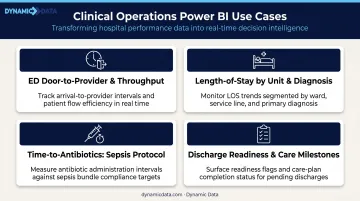
Power BI ingests data from EHR systems via FHIR connectors to give clinical teams a real-time view of patient status, lab results, vitals, and care timelines. Instead of switching between three or four systems to check on a patient, nurses and physicians see one consolidated view — cutting down on paging and communication delays in the process.
Common clinical dashboards include:
- ED door-to-provider time and patient throughput
- Length-of-stay monitoring by unit and diagnosis
- Time-to-antibiotics tracking for sepsis protocols
- Discharge readiness flags and care milestone completion
When Power BI connects to Azure Machine Learning, teams can run predictive models on EHR history to flag patients at elevated risk for readmission, ICU escalation, or medication complications. Care teams then have enough lead time to act before a situation escalates — not after it already has.
Operational Efficiency
Operations leaders use live Power BI dashboards to monitor:
- Bed occupancy and capacity by unit
- OR block utilization and room turnover times
- Staffing gaps versus patient volume
- Supply levels and procurement timing
This visibility allows managers to reassign staff, resequence surgical cases, and prepare discharges based on real-time conditions — not yesterday's report. The difference between knowing bed availability at 7am versus 7pm is significant when patient flow decisions compound throughout the day.
Financial and Revenue Cycle Management
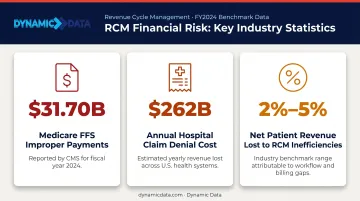
That operational visibility has a direct counterpart on the financial side — where data gaps translate into measurable revenue loss. Healthcare revenue cycle management is one of the clearest examples. CMS reported a 7.66% Medicare FFS improper payment rate in FY2024, representing $31.70 billion — and that's just one payer. Claim denials are estimated to cost hospitals roughly $262 billion annually, with providers typically failing to collect 2%–5% of net patient revenue due to RCM inefficiencies.
Finance teams use Power BI to:
- Track revenue by service line and payer
- Compare cost against volume across departments
- Monitor billing anomalies and denial patterns in real time
- Flag potential reimbursement issues before they compound
The ability to catch a documentation gap or billing error within hours — rather than discovering it at month-end — directly changes the financial outcome.
Patient Experience and Population Health
Outreach and quality teams use Power BI to track satisfaction scores, wait time trends, complaint resolution timelines, and referral turnaround. When complaint volumes spike in a specific department or referral turnaround stalls, teams can see it in days — not at the next quarterly review.
On the population health side, cohort-level dashboards segmented by diagnosis, demographics, or risk score allow preventive programs to target the populations where intervention has the most impact — before patients arrive in the ED.
HIPAA Compliance and Data Security in Power BI
Power BI supports HIPAA compliance when properly configured. Microsoft enters Business Associate Agreements (BAAs) for HIPAA/HITECH and lists Power BI as an in-scope cloud service. The platform also meets ISO 27001, ISO 27018, and SOC 2 Type 2 standards.
HIPAA compliance is not automatic. It requires deliberate setup by someone who understands both the technical controls and the regulatory requirements.
Key Security Controls
A qualified consultant will implement a layered security architecture:
| Control | What It Does |
|---|---|
| TLS 1.2+ encryption | Protects data in transit across all connections |
| Transparent data encryption | Secures data at rest in Azure SQL and Blob Storage |
| Row-level security (RLS) | Restricts which rows each user can see based on their role |
| Object-level security (OLS) | Restricts access to specific tables or columns |
| Audit logging | Records who viewed, exported, or shared reports (up to four weeks of history) |
| Entra ID + MFA | Handles authentication with multi-factor verification |
| Private endpoints | Secures on-premises access via Azure Private Link |
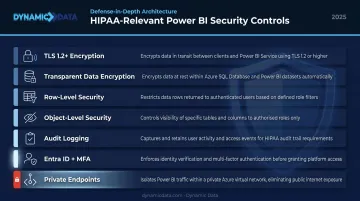
A concrete example: a ward manager sees only their unit's patient data via RLS role filters, while the CMO sees system-wide metrics. That's not a default setting — it's a configuration that has to be designed and tested.
Security controls define who can access what. Governance defines whether what they access is accurate and trustworthy.
Why Governance Matters as Much as Security
Security controls prevent unauthorized access. Governance prevents the analytics environment from drifting into chaos. Without certified datasets, clear metric definitions, and documented ownership, even a HIPAA-compliant platform can produce inconsistent reports that clinicians and administrators won't rely on.
A consulting partner establishes these standards at the outset: naming conventions, certified dataset protocols, data dictionary documentation, and a BI governance policy. Without that foundation in place from day one, data quality erodes as teams grow, reports multiply, and definitions drift.
What a Power BI Healthcare Consultant Actually Does
Discovery and Data Mapping
The consultant's job starts before any dashboard is built. Discovery involves mapping all current data sources — EHR, billing, HR, supply chain — identifying the highest-value reporting gaps, and defining the KPIs that matter most to clinical, operational, and financial stakeholders.
This phase prevents the most common failure mode: building dashboards that nobody uses because they don't answer real operational questions.
Data Engineering
Connecting to EHR systems isn't as simple as pointing Power BI at a database. A skilled consultant builds pipelines that extract, clean, and transform raw data into a reliable, tested model.
Dynamic Data's dbt-certified engineers bring this rigor to the data layer — building well-structured models with documented lineage and automated testing that catch data quality issues before they surface in a dashboard. The goal is a consistent, tested data model that stays reliable as source systems evolve — not a one-time data dump that breaks on the next update.
Dashboard and Report Development
With a clean data model in place, the consultant builds role-specific views:
- Clinicians — simple, fast, mobile-accessible views optimized for quick decisions during rounds
- Operations managers — live throughput and capacity dashboards with drill-down by unit
- Executives — trend summaries, financial performance, and quality metric scorecards
- Analysts — full drill-down capability with access to underlying data
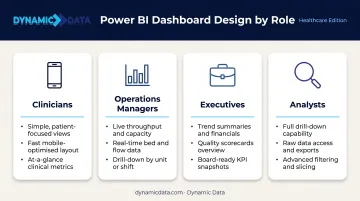
Dashboards are embedded in existing workflows — Microsoft Teams, internal portals, or dedicated devices at nursing stations — so adoption doesn't require anyone to change how they work.
Training and Handoff
A consultant who doesn't invest in user adoption leaves the organization dependent on external support indefinitely. Dynamic Data designs training aligned to each role:
- Analysts — depth in DAX and data modeling
- Clinical staff — reading dashboards, subscribing to alerts, and flagging data issues
- Executives — interpreting trends and driving decisions from metrics
The measure of a successful handoff is whether the internal team can maintain and expand the analytics environment without calling the consultant every time something changes.
How to Choose the Right Power BI Consulting Partner for Healthcare
Not all Power BI consultants are interchangeable. Healthcare-specific experience matters because the compliance requirements, integration complexity, and clinical workflow considerations are fundamentally different from a retail or SaaS analytics project.
Healthcare-Specific Evaluation Criteria
When assessing a potential partner, look for:
- Verified EHR integration experience — have they actually connected to Epic, Cerner, or FHIR-based APIs, or do they just know what FHIR stands for?
- Demonstrated HIPAA compliance configuration — can they walk through RLS design, BAA documentation support, audit log setup, and encryption configuration in detail?
- Healthcare analytics portfolio — not generic BI work, but projects where clinical or financial workflows were the actual outcome, not a dashboard screenshot
The compliance layer alone — BAA documentation, audit trail configuration, RLS design for clinical roles — requires knowledge that most generalist consultants simply haven't built. That gap becomes obvious fast once you're in implementation.
Technical Depth Requirements
The right team covers the full stack:
- Data engineers who build reliable pipelines directly from EHR APIs — not just import CSVs and call it integration
- dbt-certified developers who produce tested, documented data models with version control — so the next engineer can actually maintain what was built
- BI specialists who understand how clinical and operations staff consume data — and design dashboards around workflows, not around what looks good in a demo
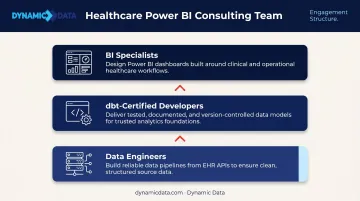
Dynamic Data fields certified dbt developers, data engineers, and BI specialists on healthcare engagements — handling every layer of the stack without subcontracting out the hard parts to generalists.
Engagement Model Questions to Ask
Before signing a contract, ask:
- Do they offer ongoing support after go-live, or just project delivery?
- How do they handle EHR system upgrades that break existing pipelines?
- What does their governance documentation look like at handoff?
- Have they worked through a compliance review process with a healthcare legal team?
EHR vendors push updates on their own schedule. A partner without a maintenance plan leaves you scrambling to fix broken pipelines on your own — often months after the project budget is closed.
Frequently Asked Questions
Is Power BI HIPAA compliant?
Yes, when properly configured. Microsoft offers a Business Associate Agreement covering Power BI as an in-scope cloud service. Row-level security, TLS encryption, audit logging, and Entra ID authentication must all be deliberately set up — compliance doesn't happen automatically.
What EHR systems does Power BI integrate with?
Power BI connects to major EHR platforms via FHIR APIs and direct connectors, including Epic, Oracle Health (Cerner), and MEDITECH. Integration complexity varies by platform and version — reliable pipelines typically require a data engineer to build and maintain the connection rather than relying on out-of-the-box connectors.
How long does a Power BI healthcare implementation take?
A focused pilot covering one department or use case can often be completed in several weeks. A full enterprise rollout with multiple EHR integrations, governance setup, and compliance review typically takes several months. Healthcare implementations run longer than other industries due to EHR complexity and clinical change management requirements.
What's the difference between Power BI and a dedicated healthcare BI tool?
Dedicated healthcare BI tools offer prebuilt EHR integrations and compliance templates, but less flexibility and higher cost. Power BI offers greater customization, deeper Microsoft ecosystem integration, and lower licensing costs — with the tradeoff that proper configuration requires consulting expertise rather than out-of-the-box setup.
How much does Power BI consulting for healthcare cost?
Costs depend on project scope, number of data sources, compliance requirements, and whether the engagement is project-based or a managed service. Request a scoped proposal based on your specific use cases for an accurate estimate.
Can a small clinic benefit from Power BI consulting, or is it only for large hospital systems?
Power BI scales to organizations of any size. Smaller practices frequently see meaningful gains in billing visibility and patient flow management. A well-scoped engagement — focused on two or three high-value reporting gaps rather than an enterprise-wide rollout — can deliver strong ROI even with a limited data environment.