Introduction
A successful Snowflake implementation requires expertise across data engineering, cloud architecture, pipeline design, and security governance. Treat it as a shortcut project and you'll pay for it — in degraded performance, runaway costs, or broken pipelines the first time production load hits.
In-house teams with dedicated data engineers and cloud architects can execute this well — as can an experienced implementation partner. Generalist IT staff without Snowflake-specific knowledge will hit walls fast.
Virtual warehouse sizing, ELT pipeline architecture, and RBAC design all require hands-on platform experience that doesn't transfer from general database administration.
When implementation is rushed or underprepared: query performance degrades under load, compute costs climb under Snowflake's consumption-based pricing, access controls leave sensitive data exposed, and pipelines that worked in testing break in production.
This guide walks through every phase of a full-service Snowflake implementation — from readiness assessment through post-go-live validation — so you know exactly what a rigorous build looks like and where teams typically cut corners.
Key Takeaways
- Full-service implementation covers every phase: architecture design, data migration, ELT pipelines, security configuration, performance tuning, and validation
- Prerequisites (source inventory, team skills, cloud environment) must be confirmed before configuration starts
- Phases follow a defined sequence; compressing or skipping them creates compounding technical debt
- Security and governance must be designed before go-live, not retrofitted after
- Post-implementation validation must pass before any workload goes production
What Full-Service Snowflake Implementation Actually Involves
Full-service Snowflake implementation is the end-to-end process of deploying, configuring, and operationalizing Snowflake for a specific business environment. That covers architecture design, data ingestion, transformation pipelines, BI tool integration, security framework, and ongoing performance management — the full picture, not just provisioning an account and standing up a database.
Snowflake's Three-Tier Architecture
Snowflake's architecture shapes every major decision in an implementation, from warehouse sizing to cost controls. It operates across three independent layers:
| Layer | Function |
|---|---|
| Database Storage | Cloud-managed columnar storage, independent of compute; data stored as compressed micro-partitions |
| Compute (Virtual Warehouses) | Independent MPP clusters that process queries without sharing resources with other warehouses |
| Cloud Services | Authentication, query optimization, metadata management, and access control |
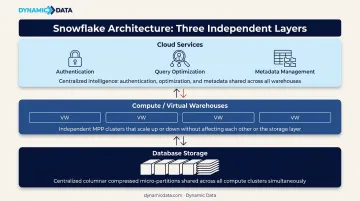
Storage and compute are fully decoupled. That means warehouse sizing is driven by query complexity and concurrency, not data volume. Warehouses can be suspended when idle and resume in seconds, so cost management becomes an active design decision rather than a fixed infrastructure cost.
Basic Setup vs. Full-Service
The gap between the two is significant:
- Basic setup: Snowflake account provisioned, database created, users added
- Full-service: Data modeling, RBAC design, ELT pipeline architecture, BI tool integration, performance tuning, governance policies, and team enablement
Skip any of these components and you're likely looking at stalled adoption, ungoverned access, or a costly rebuild once real query loads hit production.
Prerequisites and Readiness Requirements
Confirm these items before configuring anything.
Data Environment Inventory
- Complete list of all source systems: databases, SaaS platforms (CRMs, ERPs, marketing tools), flat files
- Current data volumes and 12-month growth projections
- Existing transformation logic living in ETL tools, stored procedures, or application code — document this before migration begins
- Cloud provider selection: AWS, Azure, or GCP for Snowflake account provisioning (pricing and available regions vary by platform)
Team and Skill Assessment
The team assessment directly determines your engagement model — internal execution, partner-led, or hybrid:
- Who internally needs Snowflake access, and at what privilege level
- What SQL and data engineering competencies exist in-house
- Whether the organization has capacity to manage ongoing warehouse operations post-launch
Dynamic Data often works in hybrid models: their certified team handles architecture and pipeline design, while client engineers take ownership of day-to-day operations after handoff. The Zenus engagement illustrates this well — what began as an advisory relationship evolved into an integrated delivery team over time.
Non-Negotiables Before Starting
- Defined data governance ownership — someone accountable for data quality and access decisions
- A data classification plan — which datasets are sensitive, regulated, or public-facing
- Alignment on go-live scope — which workloads are priority versus phased rollout
How to Implement Snowflake: A Phase-by-Phase Walkthrough
Snowflake implementation follows a defined sequence: assessment → architecture → data migration → integration and transformation → performance tuning → training and handoff. Compressing or overlapping phases without proper sign-offs is a leading cause of rework and cost overruns.
Phase 1: Assessment, Architecture Design, and Data Modeling
Data environment assessment:
- Map all source systems and document existing schemas and data relationships
- Identify transformation logic currently in ETL tools or stored procedures
- Define the target Snowflake data model — star schema for BI-heavy workloads, Data Vault for audit-intensive enterprise environments, wide flat tables for specific analytical use cases
Architecture design decisions to make before creating any objects:
- Cloud region and provider selection
- Database and schema hierarchy (separate raw and analytics-ready databases is the standard ELT pattern)
- Virtual warehouse plan: dedicated warehouses for loading, transformation, and reporting — never a single warehouse for all three
- Naming conventions and organizational standards
Establish these on paper first. Reorganizing a live Snowflake environment is significantly more costly than designing it correctly upfront.
Phase 2: Data Migration and ELT Pipeline Setup
Migration execution:
- Extract from source systems and apply initial structural cleansing
- Load into Snowflake landing tables using bulk
COPY INTOcommands for batch loads, or Snowpipe for continuous ingestion (serverless, micro-batch, triggers on file availability) - Validate row counts and data types at each stage before proceeding — Snowflake's native Data Validation CLI and
HASH_AGGfunction support automated cross-system comparison
ELT pipeline build:
Snowflake's compute layer is designed for transformation inside the warehouse — ELT, not ETL. As dbt Labs documents, ELT "aligns perfectly with Snowflake's architecture, which separates storage and compute to provide virtually unlimited scalability." With traditional ETL, pre-load bottlenecks are built into the process — the ELT pattern eliminates them by pushing transformation into Snowflake's compute layer after load.
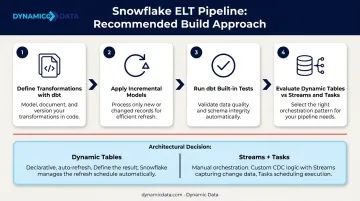
The recommended approach:
- Use dbt to define, test, and version-control transformation logic
- Apply incremental models to process only changed records rather than full table refreshes
- Use built-in dbt tests for uniqueness, referential integrity, and not-null constraints
- Evaluate Dynamic Tables before building manual Streams + Tasks pipelines — Dynamic Tables handle incremental refresh scheduling declaratively, removing custom orchestration code
Dynamic Data's certified dbt Developers, including Analytics Engineer Marcelo Bour, build pipelines designed from the ground up for Snowflake's columnar architecture rather than adapted from legacy ETL systems.
Phase 3: Integration, Security, and Governance Configuration
BI and operational tool integration:
- Configure connectors for BI tools — Tableau, Power BI, Looker, Sigma, and others connect via ODBC/JDBC drivers or native connectors
- Set up ingestion pipelines from operational systems (CRMs, ERPs, marketing platforms)
- Test end-to-end data flow from source to visualization before declaring integration complete
With integration validated, the next priority is locking down access and governance — controls that must be built in from the start, not retrofitted after go-live.
Security and governance:
Snowflake's RBAC framework uses five commonly used system-defined roles. The standard hierarchy:
| Role | Use |
|---|---|
| ACCOUNTADMIN | Top-level; grant to very few users only |
| SYSADMIN | Creates warehouses, databases, objects; parent for all custom roles |
| SECURITYADMIN | Manages grants globally |
| USERADMIN | Creates users and roles |
| PUBLIC | Auto-granted to all users |
Best practices: all custom roles should be parented under SYSADMIN; ACCOUNTADMIN should never be used for automated scripts; least privilege applies throughout.
Additional security configurations:
- Network policies: Control inbound access by IP using network rules (not legacy IP list parameters)
- Encryption: All data encrypted at rest and in transit via TLS by default
- Column-level security: Dynamic Data Masking and External Tokenization require Enterprise Edition — confirm your Snowflake edition before committing to column-level security in the architecture design
- Row access policies: Schema-level objects for row-level filtering based on user role or session context
Phase 4: Warehouse Sizing, Performance Tuning, and Cost Controls
Right-sizing virtual warehouses:
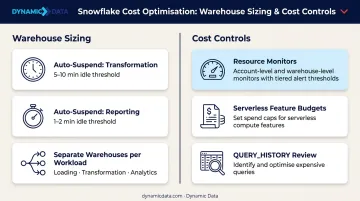
Each size increase doubles credits consumed per hour. The official Snowflake guidance is to experiment with different sizes rather than apply fixed rules — run benchmark queries on representative data volumes to identify the right size for each workload.
- Set auto-suspend to 5–10 minutes for transformation warehouses, 1–2 minutes for reporting warehouses
- Enable auto-resume so warehouses restart automatically on query submission
- Never share a single warehouse across loading, transformation, and analytics workloads — resource contention degrades all three
Cost controls before go-live:
- Configure resource monitors at both account and warehouse level — set credit limits with notify, suspend, and suspend-immediately thresholds
- Note: resource monitors only cover virtual warehouse usage; use budgets for serverless features
- Review query spend regularly using
ACCOUNT_USAGE.QUERY_HISTORY(365-day retention) to catch expensive queries before they become budget problems
Post-Implementation Validation Checklist
Before any workload goes live, run through all three of these validation areas — skipping even one can leave gaps that surface as production incidents.
Data Integrity
- Compare row counts, aggregates, and key business metrics between source systems and Snowflake
- Use Snowflake's native Data Validation CLI and
HASH_AGGfor automated comparison - Run the
VALIDATEfunction to surface any errors fromCOPY INTOexecutions
Query Performance
- Run the organization's most common and most complex queries; confirm execution times meet defined SLAs
- Use Snowflake's Query Insights tool to detect disk spillage, inefficient joins, and full table scans — Snowflake surfaces specific recommendations alongside each flagged issue
- Identify any missing clustering keys on large, frequently filtered tables
With query performance confirmed, the final step is making sure the right people can access the right data — and nothing more.
Access Control Verification
- Test that each role accesses only what it should — nothing more
- Verify sensitive data fields are masked or restricted appropriately
- Document the access control configuration — this becomes your baseline for future compliance audits
Common Snowflake Implementation Problems and How to Fix Them
Even well-planned Snowflake rollouts hit friction post-launch. These are the three most common issues — and the direct fixes for each.
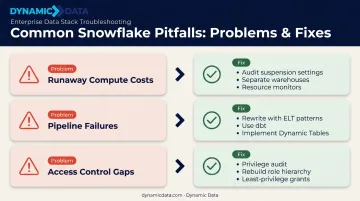
Runaway Compute Costs Post-Launch
Virtual warehouses left running without auto-suspend are the usual culprit, along with a single oversized warehouse handling every workload type — including heavy ETL jobs that spike compute unpredictably.
Fix:
- Audit warehouse suspension settings immediately
- Implement separate, correctly sized warehouses for loading, transformation, and querying
- Set resource monitor credit limits with escalating alerts
- Review the top 10 most expensive queries using
ACCOUNT_USAGE.QUERY_HISTORYand optimize clustering or rewrite inefficient joins
Data Pipeline Failures After Migration
Transformation logic built for the source system's row-based architecture was migrated as-is into Snowflake. It runs, but slowly and breaks unpredictably — because it was never adapted for columnar ELT patterns.
Fix:
- Audit and rewrite transformation logic using Snowflake-native ELT patterns
- Use dbt to modularize and test transformations with proper version control
- Implement Snowflake Streams and Tasks or Dynamic Tables for incremental processing instead of full table refreshes on large datasets
Access Control Gaps or Over-Permissioning
Teams rushed the implementation and granted users broad roles (SYSADMIN or ACCOUNTADMIN) as a shortcut — or skipped role hierarchy design entirely before go-live.
Fix:
- Conduct a role and privilege audit using
SNOWFLAKE.ACCOUNT_USAGE.GRANTS_TO_ROLES - Rebuild role hierarchy from scratch following least-privilege principles
- Replace over-broad grants with schema-level or object-level grants
- Document the intended access model and enforce it through managed access schemas
Catching these issues early — ideally during post-launch review rather than after a cost spike or security incident — keeps your implementation on track.
Frequently Asked Questions
What does a full-service Snowflake implementation include?
Full-service covers end-to-end delivery — from assessment and architecture design through data migration, ELT pipeline development, BI tool integration, security configuration, performance tuning, and team training. Basic provisioning creates an account; full-service ensures data flows, transforms, and is secured correctly.
Is Snowflake used for ETL or ELT?
Snowflake is architected for ELT — data is loaded first, then transformed using Snowflake's compute layer and tools like dbt. Traditional ETL transforms data before loading, which creates pre-processing bottlenecks. ELT is more efficient for Snowflake's columnar, scalable architecture and allows transformation logic to evolve without rebuilding pipelines.
What is Snowflake's three-tier architecture?
Three independent layers: database storage (cloud-managed columnar storage, decoupled from compute), virtual warehouses (independent MPP clusters that process queries without sharing resources), and cloud services (authentication, query optimization, metadata management). Decoupling storage and compute is what enables each layer to scale independently.
How long does a full Snowflake implementation typically take?
Timelines vary by complexity, from a focused single-use-case deployment to a full enterprise rollout with multiple sources and governance requirements. Rushing is a leading cause of rework: phase sign-offs and validation gates add time upfront but prevent far more time lost to post-launch remediation.
What are the most common mistakes to avoid?
Not designing RBAC before go-live, using a single virtual warehouse for all workload types, migrating ETL logic without adapting it to Snowflake's ELT architecture, and skipping post-migration data validation. Each of these creates costly remediation work that takes longer to fix than it would have taken to do correctly the first time.
Can Snowflake be implemented in-house, or do you need a partner?
In-house is feasible if the team includes data engineers with hands-on experience in ELT design, RBAC governance, and Snowflake performance tuning. For organizations without that depth, a certified partner like Dynamic Data cuts the path to a working production environment and prevents the architectural mistakes that are costly to unwind later.