Introduction
Most organizations have more data than ever — and still can't get a straight answer out of it.
Finance runs one revenue number. Sales reports another. Marketing has a third. Analysts spend hours tracking down the discrepancy instead of actually analyzing anything.
According to Forrester research cited by DATAVERSITY, knowledge workers lose an average of 12 hours per week chasing data across siloed systems — time that should go toward insight, not reconciliation.
Teams frequently turn to Snowflake as a fix. Most explanations, though, stop at the architecture. What actually matters is the operational impact: faster dashboards, consistent metrics, and a BI layer that scales as the business does.
This article breaks down the specific benefits Snowflake delivers for business intelligence — and where those benefits show up most in practice across sales, marketing, finance, and operations.
Key Takeaways
- Knowledge workers lose 12 hours/week reconciling siloed data; Snowflake centralizes everything in one governed platform
- Elastic, separated compute lets multiple BI teams query simultaneously without slowing each other down
- Native AI capabilities (Cortex AI, Snowpark) shift BI from backward-looking dashboards to forward-looking predictions
- AT&T achieved <1 second query response for 90% of users and 84% lower estimated annual costs after migrating to Snowflake
- Integrates natively with Power BI, Tableau, Looker, Sigma, and dbt
What Is Snowflake?
Snowflake is a cloud-native data platform that centralizes an organization's data and makes it available for analysis at any scale — without the infrastructure overhead of managing traditional data warehouses.
To set the right expectations: Snowflake is not a BI tool. You won't build dashboards in it. Instead, it's the data foundation that BI tools like Power BI, Tableau, and Looker connect to for querying, reporting, and visualization.
That distinction matters because of how Snowflake is built. Its architecture separates storage, compute, and cloud services into independent layers — so different teams and workloads can access the same data simultaneously without competing for the same compute resources.
In practice, that means faster queries, consistent data access across departments, and BI tools that don't hit performance ceilings as your data grows.
Key Benefits of Snowflake for Business Intelligence
Elastic Scalability Without Performance Tradeoffs
In a traditional data warehouse, compute is shared. When an ETL job runs, dashboard queries slow down. When the whole company opens BI on Monday morning, everything crawls. These aren't edge cases — they're predictable, recurring bottlenecks that erode analyst productivity and stakeholder trust.
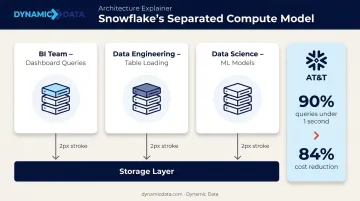
Snowflake solves this through compute isolation. Each team or workload gets its own virtual warehouse — a dedicated compute cluster that scales independently. A BI team running dashboard queries doesn't compete with a data engineering team loading tables or a data science team training models. Clusters auto-suspend when idle, so you only pay for compute when it's actually running.
The practical outcome is measurable. AT&T achieved sub-1-second response times for 90% of user queries and an estimated 84% reduction in annual costs after moving to Snowflake. Snowflake's own engineering benchmarks test this concurrency at scale — running 14 representative dashboard queries across up to 128 simultaneous users on a 10-cluster multi-cluster warehouse, tracking both median and P99 latency to prevent performance regression.
KPIs this affects:
- Dashboard load time and query response rates
- Analyst productivity (reports delivered per sprint)
- Infrastructure cost per query
- Query concurrency without timeout errors
This advantage matters most for organizations with high user concurrency, large datasets, or mixed workloads where reporting, ingestion, and ML all run simultaneously.
A Unified, Single Source of Truth Across Teams
The "whose number is right?" debate is one of the most common — and most wasteful — problems in business intelligence. When CRM data lives in one system, ERP data in another, and marketing data in a third, every team ends up maintaining their own extracts and definitions. The result: the same metric has three different values depending on who you ask.
Snowflake addresses this by centralizing all organizational data — from CRM, ERP, marketing platforms, and operational systems — into one governed repository. When every BI tool queries the same underlying tables with the same definitions, revenue in the finance dashboard matches revenue in the sales dashboard. Role-based access control, data masking, and governed metric definitions enforce that consistency at the architecture level — not through manual reconciliation.
Gartner estimates poor data quality costs organizations at least $12.9 million per year on average. Much of that cost comes from decisions made on inconsistent data and the reconciliation work that follows. Centralizing in Snowflake cuts those loops and makes dashboards trustworthy enough that stakeholders actually use them.
KPIs this affects:
- Time spent on manual data reconciliation
- Dashboard adoption rates
- Report-to-decision cycle time
- Audit and compliance efficiency
This benefit is most pronounced for mid-to-large organizations with multiple business units, those going through M&A or digital transformation, and companies pulling data from disparate systems across geographies.
Dynamic Data's analytics engineering team — which includes dbt Certified Developers — builds this kind of governed Snowflake data layer, modeling data upstream so BI tools connect to tables that are already clean, structured, and consistently defined.
AI and Machine Learning Readiness Within the BI Layer
Traditional BI describes what already happened. Snowflake's native AI capabilities shift that from descriptive to predictive — surfacing what's likely to happen next, directly within the same platform.
Through Cortex AI and Snowpark, data teams can run forecasting models, anomaly detection, and natural language queries directly inside Snowflake — without exporting data to a separate ML environment and reimporting results. That eliminates pipeline latency and keeps governance centralized. Cortex ML-based forecasting and anomaly detection reached general availability in December 2023, and the full suite of Cortex AI SQL operators became GA in November 2025.
The business case for this shift is real, but the gap between adoption and impact is wide. McKinsey's 2025 State of AI survey found that 88% of organizations now use AI in at least one function — but only 39% report enterprise-level EBIT impact. The organizations capturing value are the ones embedding AI directly into operational workflows, not running it in isolated research environments.
Snowflake's architecture makes that integration practical for BI. Instead of a separate ML pipeline that produces results days later, demand forecasts, churn predictions, anomaly flags, and next-best-action prompts can surface directly in the dashboards business users already work from.

KPIs this affects:
- Forecast accuracy for key business metrics
- Reduction in analyst time on manual SQL reporting
- Business user self-service rate
- Time-to-insight for ad hoc questions
This matters most for organizations with high-frequency decisions — retail, e-commerce, financial services, supply chain — and for teams with growing non-technical user bases who need answers without waiting in analyst queues.
Real-World BI Use Cases for Snowflake
These capabilities show up in consistent, measurable ways across departments. Here's how organizations are putting Snowflake to work in practice:
Sales and Revenue Analytics
Snowflake consolidates CRM, transaction, and pipeline data into a single layer, giving sales teams a real-time view of revenue performance, quota attainment, and deal velocity. Because metric definitions are governed centrally, a territory rep and a VP of Sales see the same numbers — no version conflicts across leadership reports.
Marketing and Customer 360
Unifying behavioral, campaign, and customer data across channels enables cohort analysis, attribution modeling, and personalized campaign performance reporting. BVK, a marketing agency, reduced data costs by approximately 75% and accelerated dashboard load times by 50% by consolidating marketing data on Snowflake — eliminating the manual spreadsheet exports that typically slow marketing analytics cycles.
Finance and Operational Reporting
Finance teams use Snowflake to automate recurring reports — P&L, budget vs. actuals, cash flow — and reduce the manual effort of pulling from disparate ERP and accounting systems. Governance features like RBAC and data lineage make the output audit-ready without additional manual controls.
Supply Chain and Anomaly Detection
Operations teams use Snowflake's ML capabilities to detect demand anomalies, flag supplier risk, and track logistics KPIs in near-real time. Honeywell used Snowflake to unify supply chain and manufacturing data across the organization, shifting teams from chasing discrepancies in siloed reports to acting on a shared, consistent view of operations.
What Happens When BI Runs Without a Modern Data Platform
The costs of fragmented BI infrastructure accumulate faster than most teams realize.
Each new data source added to a legacy stack increases reconciliation effort. Analysts spend more time fixing broken pipelines than generating insights. Dashboards contradict each other, and eventually stakeholders stop trusting them — defaulting to spreadsheets or gut instinct for decisions that should be data-driven.
The compounding effect is the real problem. Small issues escalate predictably:
- A minor inconsistency in metric definitions becomes an organization-wide trust issue at scale
- A slow dashboard gets abandoned rather than fixed
- A manual reconciliation that takes two hours today takes eight when data volume triples
Beyond the time and trust costs, organizations without a unified platform default to reactive decision-making. Reports lag behind reality. By the time a trend surfaces in a dashboard, the window to act on it has often passed. That's a data foundation problem. No BI tool can compensate for it.
How to Get the Most Value from Snowflake for BI
Getting Snowflake in place is only part of the work. How you model data, govern compute, and operationalize dashboards determines whether the platform delivers real BI value or just moves the problem around.
1. Model data correctly before connecting BI tools Snowflake performs best when data is structured upstream — clean dimensional tables, consistent grain, centrally governed metrics. Connecting BI tools to poorly modeled data just shifts the inconsistency problem into the reporting layer. Dynamic Data's analytics engineers, including dbt Certified Developers, focus on building this governed data layer before any dashboards go live.
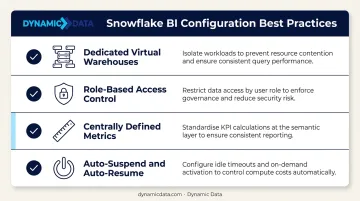
2. Configure governance and compute from the start
- Assign dedicated virtual warehouses per BI workload to prevent query contention
- Enable role-based access control so the right people see the right data
- Define metrics centrally, not inside individual BI tool calculations
- Set auto-suspend and auto-resume on compute clusters to control costs
3. Operationalize BI — don't just deploy it Snowflake delivers the most when dashboards are embedded in real decision workflows, reviewed on a regular cadence, and updated as the business evolves. Teams that treat BI as a living practice — not a one-time build — are the ones that successfully layer in predictive models, new data sources, and self-service capabilities as their needs grow.
Conclusion
Snowflake's value for BI comes from three compounding strengths:
- Elastic scalability — reporting workloads grow without performance tradeoffs
- Centralized governance — a single source of truth that teams can actually trust
- Native AI capabilities — shifting BI from describing the past to guiding future decisions
These advantages build on each other. Consistent data builds stakeholder trust. Trusted data drives adoption. Adoption justifies investment in more advanced capabilities — forecasting, anomaly detection, self-service analytics. Getting the foundation right early reduces technical debt and opens the door to predictive and self-service BI work that wouldn't be feasible otherwise.
Treating Snowflake as an ongoing strategic practice — not a one-time setup — is what separates teams that plateau from those that compound their BI capabilities over time. Teams looking to implement or optimize their Snowflake stack can work with partners like Dynamic Data, who specialize in Snowflake architecture, BI integration, and data strategy for mid-market and enterprise clients, to move faster and avoid costly design mistakes early.
Frequently Asked Questions
What type of tool is Snowflake?
Snowflake is a cloud-native data platform (data warehouse), not a BI tool. It stores and processes data that BI tools then connect to for reporting and visualization. Think of it as the data foundation, not the front-end interface.
What BI tools integrate with Snowflake?
Snowflake integrates natively with Power BI, Tableau, Looker, Metabase, Sigma Computing, ThoughtSpot, and many others. Most tools push queries directly to Snowflake for execution rather than extracting data locally.
What is the best BI tool to use with Snowflake?
It depends on your team's profile and governance needs. The right choice depends on your existing stack and user base:
- Looker — best for teams needing a governed semantic layer
- Power BI — fits Microsoft-centric environments
- Tableau — strong for visualization-heavy use cases
Does Power BI connect to Snowflake?
Power BI connects to Snowflake via DirectQuery (live, pushdown queries) or Import mode. DirectQuery is recommended for large datasets needing up-to-date reporting, since queries execute directly in Snowflake rather than the Power BI engine.
Does Snowflake have AI capabilities?
Snowflake includes native AI through Cortex AI (LLM access, text-to-SQL, sentiment analysis), Snowpark (Python and ML model execution inside Snowflake), and Snowflake ML functions for forecasting and anomaly detection. All of this runs without moving data to a separate platform.
How does Snowflake enable AI for business intelligence?
Snowflake lets teams run predictive models, natural language queries, and automated data preparation within the same platform where BI queries execute. This eliminates the data movement and pipeline latency that typically separates ML outputs from reporting workflows.