Introduction
Most organizations don't have a data problem — they have a data fragmentation problem. CRM data lives in Salesforce, marketing metrics sit in Google Analytics, finance numbers are locked in spreadsheets, and each team runs their own exports. According to MuleSoft's 2024 Connectivity Benchmark Report, 81% of IT leaders cite data silos as a hindrance to digital transformation, and IT teams burn 37% of their time building and maintaining custom integrations just to connect these systems.
The result: BI dashboards show conflicting numbers, and ML models train on incomplete snapshots of reality.
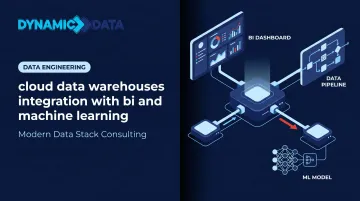
Cloud data warehouses solve this by acting as the active integration layer — connecting BI tools and ML pipelines to a single, consistent data source rather than just storing data centrally. When both BI and ML draw from the same warehouse environment, teams work from the same numbers instead of reconciling conflicting exports.
This post covers why cloud data warehouses serve as the foundation for both BI and ML integration, how each connection pattern works, what architecture decisions matter most, and where implementations typically break down.
Key Takeaways
- Cloud data warehouses centralize data from all business sources into one governed environment that BI tools and ML pipelines share
- BI integration replaces manual exports with automated dashboards, real-time reporting, and self-service analytics
- ML integration lets teams train models on warehouse data and write predictions back into the same environment for BI consumption
- Architecture choices around ELT pipelines, data modeling, and semantic layers determine how well both BI and ML consumers perform
- Data quality gaps, schema drift, and disconnected tools are the top reasons integrations fail
Why Cloud Data Warehouses Are the Foundation for BI and ML Integration
Traditional on-premise warehouses were built for one job: serving aggregated reports to analysts. Rigid schemas, batch-only updates, and shared compute made it impractical to simultaneously support a BI tool pulling historical summaries and a data scientist querying millions of raw rows for model training.
One workload regularly starved the other.
Cloud data warehouses break that constraint through separation of compute and storage. Snowflake, BigQuery, Redshift, Databricks, and Azure Synapse can spin up independent compute clusters against the same underlying data. A Power BI dashboard, a dbt transformation job, and an ML training run all run concurrently — each gets what it needs without blocking the others.
The Single Source of Truth Advantage
When BI tools and ML pipelines draw from different data environments — a BI extract cache here, an S3 feature dump there — metric discrepancies are inevitable. Teams spend hours reconciling why the churn rate in the dashboard differs from what the model was trained on. The warehouse eliminates this by establishing one governed layer both consumers share.
This matters commercially. A Forrester TEI study for Snowflake found organizations using a centralized AI data cloud achieved 354% ROI with payback in under six months, including a 35% improvement in data engineer productivity and a 6% increase in incremental revenue from data-driven decisions.
Platform-Native BI and ML Integration
That ROI comes partly from choosing the right platform — and each major cloud warehouse takes a different approach to BI and ML integration:
- Snowflake — broad BI connectors, Cortex for in-warehouse ML inference, and Snowpipe for real-time ingestion
- Google BigQuery — SQL-based model training via BigQuery ML, with deep native integration into Looker
- Databricks — a lakehouse architecture that unifies analytics and ML workloads under Unity Catalog governance
- Azure Synapse — tight Power BI connectivity and end-to-end ML support across the data lifecycle
- Amazon Redshift — Redshift ML for in-database model training and direct connectivity to leading BI tools
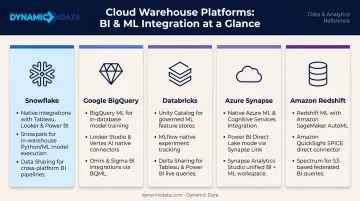
The right choice depends on existing infrastructure, data volumes, and how tightly BI and ML workflows need to align — decisions Dynamic Data helps clients navigate from architecture through deployment.
How Cloud Data Warehouses Connect with BI Tools
Connecting BI Tools to the Warehouse Layer
Two primary connection patterns exist, and choosing the wrong one creates real problems:
| Pattern | How It Works | Best For |
|---|---|---|
| Direct Query | BI tool queries the warehouse live at runtime | Real-time dashboards, large datasets, strict data freshness requirements |
| Extract / Import | BI tool caches a data extract in memory | Fast interactive exploration, smaller datasets where staleness is acceptable |
Power BI's Import mode is the default for good reason — in-memory querying is fast. But for sales dashboards that need today's numbers or operational monitoring where yesterday's data is wrong, DirectQuery against a cloud warehouse is the right call.
Between the warehouse and the BI tool sits the semantic layer — the most underrated part of a well-integrated stack. Tools like dbt's Semantic Layer (powered by MetricFlow) and Looker's LookML let teams define metrics once, centrally, so every BI tool reports identical definitions for revenue, churn, and conversion. No more "marketing uses a different formula for MRR than finance."
About 30,000 companies use dbt weekly, and a core reason is that it moves transformation logic — including metric definitions — into the warehouse where it can be versioned, tested, and shared. Dynamic Data's dbt Certified Analytics Engineers implement exactly this pattern for clients, ensuring that metric definitions don't fragment across individual BI calculated fields.
Real-Time Reporting and Self-Service Analytics
Near-real-time dashboards require streaming ingestion. Two warehouse-native capabilities make this possible:
- Snowpipe Streaming loads rows directly into Snowflake tables as they arrive, with end-to-end latency as low as 5 seconds
- BigQuery Storage Write API supports exactly-once delivery with immediate query availability after each write
Both capabilities mean BI dashboards reflect current data rather than last night's batch run.
Dynamic Data applied this approach for Zenus, transforming a static Looker Studio dashboard into a live, real-time view of event data — giving Zenus clients immediate access to insights captured at key points of interest rather than waiting for daily refreshes.
That real-time access only delivers value if the right people see the right data. Both Snowflake and BigQuery support row-level security policies that control exactly which rows a given user or role can see. When BI tools connect via warehouse credentials, those policies apply automatically, with no need to configure separate permission sets inside Tableau, Power BI, or Looker.
How Cloud Data Warehouses Power Machine Learning Pipelines
Using Warehouse Data for Model Training
Data scientists spend roughly 38% of their time on data preparation and cleansing before any modeling begins. Cloud data warehouses cut this significantly by bringing compute to the data rather than the reverse.
Instead of exporting raw tables to a local environment and running transformation scripts, data scientists query the warehouse directly — using SQL window functions, complex joins, and aggregations at scale — to produce ML-ready feature sets. The warehouse handles the heavy lifting; the scientist focuses on feature logic.
Native in-warehouse ML takes this further:
- BigQuery ML — train linear regression, logistic regression, k-means, time-series forecasting, and XGBoost models using GoogleSQL directly against warehouse tables
- Snowflake Cortex — LLM-powered functions for unstructured data plus ML functions for forecasting and anomaly detection
- Redshift ML — SQL-based model training using XGBoost, MLP, K-Means, and Linear Learner
- Azure Synapse — ML support spanning data acquisition through deployment and scoring
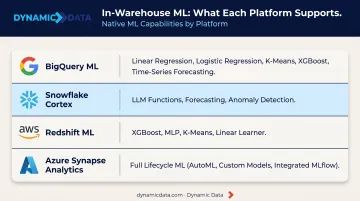
For models requiring more complex architectures, teams export feature sets to Vertex AI or SageMaker — but the feature data still originates from the warehouse.
Feature stores increasingly live inside the warehouse itself. Precomputed features stored as versioned warehouse tables are governed, documented, and reusable across model iterations. Databricks Feature Store registers feature tables in Unity Catalog for cross-workspace sharing and lineage tracking. This prevents two data scientists from independently computing the same feature differently and training on inconsistent inputs.
Writing ML Predictions Back to the Warehouse
The closed loop is where BI and ML integration pays off. After a model runs, its outputs are written back into the warehouse as new tables alongside historical actuals. Analysts can then ask questions like: "Where does our model predict churn this month, and how does that compare to last quarter's actuals?"
Prediction types commonly written back to the warehouse include:
- Churn scores — flagging at-risk accounts before they cancel
- Demand forecasts — projected inventory needs by SKU or region
- Anomaly flags — surfacing outliers in financial or operational data
- Lead scores — ranking pipeline opportunities by conversion likelihood
Dynamic Data structures these closed-loop ML workflows so prediction outputs land directly in clients' warehouse environments, where BI tools and downstream business processes can query them immediately — no extra data movement required.
Building an Integrated Data Stack: Key Architecture Considerations
The integrated stack only performs as well as the architecture underneath it. Three decisions drive the majority of outcomes:
1. ELT Tool Selection and Pipeline Structure
Transformation logic belongs in the warehouse, not scattered across BI calculated fields and ML preprocessing scripts. An ELT approach — load raw data first, transform inside the warehouse using dbt — keeps all logic centralized, version-controlled, and testable. The alternative, where each team transforms data independently, guarantees divergence.
2. Data Modeling Layers
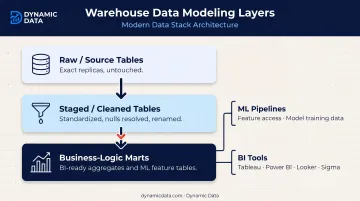
A well-structured warehouse separates three distinct layers:
- Raw/source tables: exact replicas of source system data, untouched
- Staged/cleaned tables: standardized formats, nulls resolved, columns renamed for consistency
- Business-logic marts: aggregated, business-ready tables for BI; granular feature tables for ML training
BI tools consume marts. ML pipelines access staged or mart tables depending on whether they need aggregates or row-level detail. Both operate in the same governed environment.
3. Governance and Documentation
The "which table is the source of truth?" question destroys analyst productivity. Metadata catalogs, column-level documentation, and data lineage tracking answer it before it becomes a recurring argument. A Forrester TEI study found improved analyst productivity of up to 30% through better metadata management and lineage visibility. Dynamic Data builds governance frameworks into every data architecture engagement — setting data ownership standards and documentation requirements at the outset, not as an afterthought.
Common Integration Challenges and How to Solve Them
Data Quality at the Source
Poor data quality is the root cause of most BI and ML failures. Dashboards showing wrong numbers and models producing unreliable predictions almost always trace back to upstream quality issues — not the BI tool or the ML framework.
The scale of the problem is significant:
- Gartner estimates poor data quality costs organizations $12.9M annually on average
- The dbt Labs 2025 State of Analytics Engineering report found 56% of data professionals cite data quality as their top challenge
- 57% spend most of their workday maintaining datasets rather than producing insights
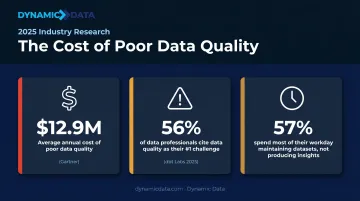
Running data validation tests as part of every pipeline — before data reaches BI or ML consumers — catches problems at ingestion. Not-null checks, uniqueness constraints, and referential integrity tests surface issues early, before a business decision gets made on bad data.
Schema Drift Breaking Downstream Pipelines
Source systems change constantly. A CRM adds a field. A payment processor renames a column. Without monitoring, that change silently breaks a downstream BI report or ML feature pipeline, and teams discover it only when the numbers stop making sense.
Monitoring and alerting on schema changes — combined with documented contracts between source and transformation layers — catch breaks before they surface as incorrect business metrics. Dynamic Data builds automated testing pipelines into integration work specifically to detect these structural problems before they reach end consumers.
The Siloed Tooling Trap
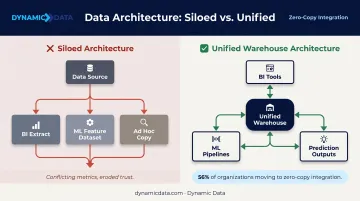
Organizations frequently accumulate separate data copies: one extract for BI, one feature dataset for ML, another for ad hoc analysis. Each diverges over time. When the BI dashboard and the ML model both report on customer retention but disagree on the number, trust in both erodes.
The solution isn't technical — it's architectural discipline. The warehouse must be the canonical layer both tools consume from. 56% of organizations are moving toward zero-copy data integration precisely to eliminate this duplication. Dynamic Data's integration engagements enforce this architecture directly: BI tools connect to the warehouse, ML pipelines read from warehouse tables, and prediction outputs write back to the warehouse — no competing copies.
Frequently Asked Questions
What is the difference between BI integration and ML integration with a cloud data warehouse?
BI integration connects dashboards and reporting tools to consume aggregated, curated warehouse data for visualization and analysis. ML integration uses granular warehouse data to train models, then writes prediction outputs back into the warehouse. Both rely on the same data, but they serve very different purposes.
Which cloud data warehouse platforms have the strongest native BI and ML integrations?
Snowflake offers broad BI connectors and Cortex for in-warehouse ML. Google BigQuery provides native BigQuery ML and deep Looker integration. Databricks unifies analytics and ML on a lakehouse. Azure Synapse integrates natively with Power BI and supports ML across the full pipeline.
How do machine learning models access data stored in a cloud data warehouse?
ML models access warehouse data through three main paths:
- Direct SQL queries for feature extraction against warehouse tables
- Exported datasets pushed to external platforms like Vertex AI or SageMaker
- Native in-warehouse ML (BigQuery ML, Snowflake Cortex, Redshift ML) that trains models directly on stored data
What role does data transformation play in cloud DWH integration with BI and ML?
Transformation — typically via ELT tools like dbt — cleans, structures, and models raw warehouse data into the organized tables that BI tools and ML pipelines rely on. Without it, both consumers face inconsistent, unreliable data drawn from different interpretations of the same source.
Do I need a data lakehouse instead of a data warehouse for ML workloads?
A cloud data warehouse handles most structured ML workloads well. A lakehouse architecture (Databricks, or BigQuery combined with GCS) adds value when ML requires unstructured data like images or text, or when workloads need multiple processing engines like Spark alongside SQL.
What are the biggest challenges when integrating a cloud data warehouse with ML pipelines?
Three issues come up most often:
- Data quality — poor source data produces unreliable training sets that quietly degrade model performance
- Schema drift — when source systems change, feature pipelines break in ways that aren't always immediately obvious
- Writeback design — surfacing ML outputs in a form BI tools can query requires upfront architecture decisions most teams underestimate