Each of these tools captures valuable data — but by default, none of it connects. The result is predictable: teams manually reconciling spreadsheets, campaigns optimized on incomplete attribution, and inventory decisions made hours or days after the data that should inform them was generated.
According to IDC research, companies lose 20–30% in revenue annually due to inefficiencies caused by data silos. That's not a small operational inconvenience — it's a structural drag on growth.
This guide explains how to fix it. Not just what data integration is, but how to implement it step by step, what to have in place first, and where it delivers the clearest return.
Key Takeaways
- Data integration unifies your ecommerce stack — CRM, inventory, marketing, and support — into a single source of truth
- Without it, teams rely on manual reconciliation that creates errors, delays, and blind spots
- Implementation follows a clear sequence: audit your stack, pick the right approach, connect systems, then monitor and iterate
- The biggest payoffs are in inventory accuracy, marketing attribution, personalized customer experience, and business reporting
- Governance and automation determine whether integration holds up as your data volume grows
When Does Your Ecommerce Business Need Data Integration?
The trigger isn't reaching a certain revenue threshold. It's operational friction — and it shows up in specific, recognizable ways.
Signs your business needs integration now:
- Teams manually copying data between systems (orders to spreadsheets, spreadsheets to CRM)
- Reports that require pulling from three or more dashboards and stitching together manually
- Inventory counts that differ between your website, Amazon storefront, and your warehouse system
- Marketing campaigns you can't measure end-to-end because ad data and revenue data live in separate tools
- Customer support agents who can't see order history without switching platforms
Multi-channel sellers feel this urgency earliest. Selling across a website, Amazon, and social channels creates real risk from fragmented inventory and order data: overselling, delayed fulfillment, and customer complaints compound faster than they do for single-channel stores.
Single-channel businesses hit the same wall once they layer on email marketing, loyalty programs, and customer support tools. The data sources multiply; the manual work follows.
Zapier's State of Business Automation report found that 38% of small business employees identify data entry as their most time-consuming task. That's a large share of working hours going toward work that integration can eliminate.
Every week spent reconciling data manually is a week your competitors spend acting on theirs.
What to Have in Place Before You Begin
Skipping these three prerequisites is the most reliable way to cause an integration project to fail or create new data quality problems.
1. A Complete Inventory of Your Tech Stack
Document every platform, tool, and database your ecommerce business uses — and what data each one holds. This sounds obvious, but most businesses discover tools they'd forgotten about during this exercise. Without a full picture, integration projects expand scope and miss critical connections.
2. Defined Data Ownership and a Source of Truth
Before syncing anything between systems, decide which system holds the authoritative version of each core data type: customer records, product data, order history. If you connect systems without this decision made, you'll replicate conflicting data in multiple places and create a bigger mess than you started with.
3. A Basic Data Governance Policy
Three questions need answers before you connect anything:
- Who can access which data — and at what level of detail?
- How will sensitive customer information (payment data, email addresses, behavioral data) be handled and stored?
- Which compliance requirements apply: GDPR for EU customers, CCPA for California, PCI DSS for payment processing?
Once systems are connected and data flows freely between them, the exposure surface for security and compliance risk expands. Getting governance in place first is far cheaper than adding it after an incident.
How to Implement Data Integration in Your Ecommerce Store
The most common reason integration projects fail is connecting systems before completing the audit and mapping phases. Successful implementation follows a defined sequence — skip ahead and you'll spend weeks untangling problems that didn't need to exist.
Step 1: Audit and Map Your Existing Data Sources
Document every system in your stack and answer three questions for each:
- What data does this system generate?
- How is it stored and structured?
- Which other systems currently consume or need this data?
Map these relationships visually — a simple flow diagram works. The goal is to see gaps (data that exists but isn't flowing anywhere useful) and redundancies (the same data field stored differently in multiple systems).
Flag data quality issues at this stage: inconsistent field naming, duplicate customer records, incomplete product data. These problems carry forward into any integration pipeline if not addressed at the source.
Step 2: Choose the Right Integration Approach
There are four main options, each suited to different situations:
| Approach | Best For | Trade-offs |
|---|---|---|
| Native connectors | Common platform pairings (e.g., Shopify + Klaviyo) | Easy to set up; limited flexibility |
| iPaaS platforms (Zapier, Make) | Multi-step workflows without heavy coding | Good middle ground; can hit limits at scale |
| Custom API integrations | Specific, complex connections | Maximum flexibility; requires development resources |
| ETL/ELT pipelines + data warehouse | Analytics-heavy operations needing a single source of truth | Most powerful for reporting; higher implementation effort |
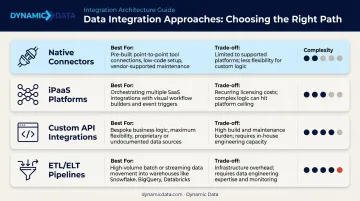
Most ecommerce businesses end up using a hybrid: native connectors for operational integrations (order sync, inventory updates) and ETL pipelines for analytics and reporting. Dynamic Data helps ecommerce businesses assess their stack and design integration architectures that fit their actual operational needs. That includes building modern data stacks on platforms like Snowflake, BigQuery, and dbt — sized for where the business is today and where it's headed.
Step 3: Connect Systems and Automate Your Pipelines
Prioritize integrations by business impact. Start with the highest-friction connections:
- Ecommerce platform → inventory system — prevents overselling and stock discrepancies
- CRM → email marketing platform — enables segmentation based on actual purchase behavior
- Ad platforms → revenue data — makes campaign ROI measurable end-to-end
- Support platform → order history — gives agents context without platform-switching
Manual or semi-manual data transfers undercut the entire point of integration. Define the pipeline logic once — on a schedule or via event-driven webhooks — then let it run without intervention.
Step 4: Monitor, Validate, and Continuously Improve
Once pipelines are live, watch these metrics:
- Data sync latency — how long does it take for a change in one system to appear in downstream systems?
- Error rates and failed job logs — which pipelines are failing, and how often?
- Downstream accuracy — do your dashboards and reports reflect correct, current data?
Set up alerts for integration failures so issues surface immediately rather than quietly corrupting downstream reports. Schedule a monthly review to check whether integration logic still fits the business — new product lines, new marketing channels, and platform migrations all require pipeline updates.
Where Ecommerce Data Integration Creates the Most Value
Inventory and Supply Chain Accuracy
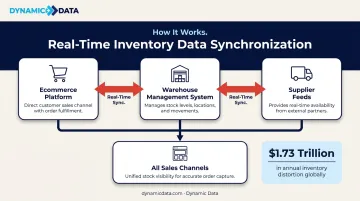
When your ecommerce platform, warehouse management system, and supplier feeds share real-time data, inventory counts update across all channels simultaneously. The operational cost of not doing this is substantial: IHL Group reports that global retail loses $1.73 trillion annually due to inventory distortion — the combined impact of out-of-stocks and overstock. Overselling is almost always a data synchronization problem, not a demand problem.
Marketing Performance and Attribution
Integrated data from ad platforms, email tools, and your ecommerce platform makes it possible to calculate true campaign ROI — connecting actual spend to actual revenue per channel, not just clicks or opens.
Right now, 78.4% of marketers rely on last-click attribution, which misattributes credit for conversions that involved multiple touchpoints. Integration doesn't just clean up reporting — it changes which campaigns get budget.
Personalized Customer Experience
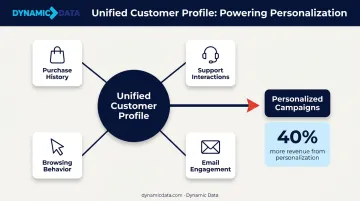
A unified customer profile built from purchase history, support interactions, and browsing behavior enables targeting that siloed tools can't support. For instance, triggering a re-engagement campaign when a high-LTV customer hasn't purchased in 90 days — using data that only exists if your ecommerce platform and CRM are connected.
McKinsey research shows companies that excel at personalization generate 40% more revenue from those activities than average competitors — and 76% of consumers say they get frustrated when that personalization is missing.
Business Intelligence and Reporting
With data flowing into a central warehouse or BI layer, leadership gets a live view of KPIs without waiting for someone to manually compile a report. Tools like Tableau, Power BI, Looker, or Sigma connect directly to integrated warehouses and turn what used to be a two-day reporting exercise into a live dashboard. Metrics that become immediately visible include:
- Revenue, AOV, and customer LTV by channel
- Return rates and their impact on margin
- Cohort performance and repeat purchase trends
Customer Support Quality
When support agents can see order history, open tickets, and past communications in a single view, resolution times drop. Salesforce's State of Service report makes the gap clear:
- 26% of service reps often lack context about a customer's situation
- 80% say better access to other departments' data would improve their performance
Connecting your support platform to your ecommerce and CRM data closes that gap — without replacing the tools your team already uses.
Best Practices for Getting Consistent Results
Treat Integration as an Ongoing Capability
Every new tool added to your stack needs to be evaluated for how it connects to existing systems. Integration decisions belong in your technology procurement process — not as an afterthought after the tool is already in use by three teams.
Prioritize Data Quality at the Source
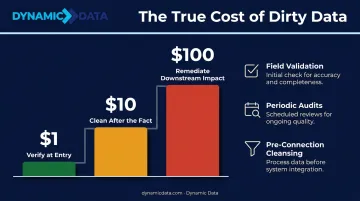
Poor data flowing through a clean pipeline still produces unreliable outputs. Gartner estimates poor data quality costs organizations at least $12.9 million per year on average. The cost curve is steep: roughly $1 to verify a record at entry, $10 to clean it up after the fact, and $100 to remediate downstream business impact once errors propagate.
To keep data quality high from the start:
- Establish field validation rules at every intake point
- Run periodic data audits on high-traffic tables
- Cleanse records before adding new system connections — not after
Build for Scalability
Design pipelines that account for growing data volumes, API rate limits, and the eventual need to add new systems without rebuilding existing connections from scratch. Businesses working with analytics engineering teams that specialize in dbt can build modular, maintainable pipeline architectures that adapt as the business changes — rather than accumulating technical debt every time a new platform is added.
Consistently maintained integration produces a fuller data picture over time. That completeness is what makes downstream decisions reliable — whether you're adjusting inventory, reallocating campaign budgets, or identifying churn risk before it hits revenue.
Frequently Asked Questions
What is ecommerce platform integration?
Ecommerce platform integration connects your online store (Shopify, BigCommerce, WooCommerce, etc.) to back-office and marketing systems — such as ERP, CRM, and email tools — so data flows automatically between them without manual entry. The goal is a single, consistent data layer across all operational systems.
What are the benefits of data integration?
The core benefits are eliminating manual data entry, ensuring consistent data across systems, enabling real-time reporting, powering personalized marketing, and giving leadership a unified view of business performance. Together, they reduce operational costs and sharpen every business decision.
How do you automate data integration?
Automation is achieved through iPaaS platforms (Zapier, Make), native connectors built into ecommerce platforms, or ETL/ELT pipelines connected to a data warehouse. You define the data flows and sync schedules once; the system handles transfers automatically based on triggers or scheduled intervals.
What is the best data integration platform?
The right choice depends on your stack complexity and technical resources. Native connectors suit simple platform pairings; iPaaS tools (Zapier, Make) handle multi-step workflows without heavy development; ETL/ELT pipelines into a data warehouse are best for analytics-heavy operations that need a reliable single source of truth.
What are the best data privacy practices for ecommerce integrations?
Ecommerce integrations require encrypted data transfers (HTTPS/TLS), least-privilege access controls, and compliance with GDPR and CCPA. Prioritize platforms with SOC 2 Type II certification, and apply data masking for sensitive fields alongside clear retention policies.