

What's Actually Under Your Model? The Snowflake Well-Architected Acid Test
Someone on your team ships an agent on a Friday. By Monday it has answered a few hundred business questions, and every one of them fired dozens of queries in seconds against a warehouse sized for a morning dashboard refresh. The answers were fine. The credit bill wasn't, and nobody had set a limit, because nobody had planned for that workload.
Nothing about that account was badly built, it was built for a different job. Most Snowflake accounts were designed around analysts and scheduled reports, and agents use them differently: more queries, new identities calling the same views through tools, and spend that grows with every question. So how would you know, today, whether your own account is ready for that?
That's what Snowflake's Well-Architected Framework (WAF) is for, and unlike most architecture standards it isn't only a document. Snowflake publishes the assessment as an open skill you can read before you run it, which means the acid test is available to you this afternoon. It also means you can read how the test is written, and that turns out to matter.
One distinction before we start: the assessment checks how your account is set up, not what your data means. Whether three systems agree on what a customer is, or whether an agent can trace an answer back to its sources, is a context problem, and we covered it in what Snowflake Summit 2026 taught us about building AI that works. This post is about the account underneath.
What a Snowflake WAF Assessment Run Looks Like
The framework has two modes. For a new account there are blueprints that generate the environment from the standard. For an account already in production there's the Well-Architected assessment, and that's the one most of us need.
You ask CoCo, the agent formerly named Cortex Code, to run a WAF assessment. It needs an active connection to your own account with ACCOUNTADMIN, or a role that can read SNOWFLAKE.ACCOUNT_USAGE, because that's what every check queries. It detects your org, your account, and your edition, then asks which pillars you want assessed.
That's the scoping decision, and it's narrower than people expect. You don't scope by use case or by domain, but by pillar. Five are available: Security & Governance, Operational Excellence, Reliability, Performance, and Cost Optimization. Between them they hold 67 controls, grouped into domains like Authentication, Compute, and Data Protection.
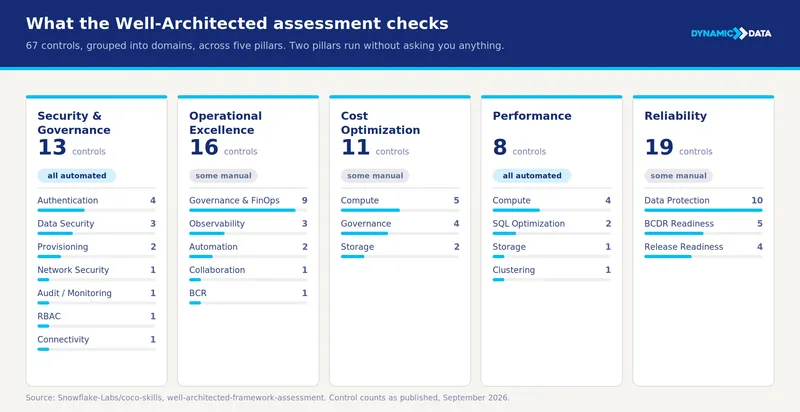
From there it dispatches one subagent per pillar, all running their SQL concurrently. While that happens, it asks you the questions it can't answer from metadata, and that split is worth knowing before you start. Security & Governance and Performance are entirely automated and need nothing from you. Operational Excellence, Cost Optimization, and Reliability will stop and ask. Reliability wants to know whether you've ever performed a disaster recovery (DR) drill. Operational Excellence wants to know whether your environment is truly managed as code. Those aren't questions a query can answer, and they tend to be the ones people can't answer either.
What comes back is a score per pillar and an overall score, both counted in controls rather than individual checks. Each control lands on a three-tier scale: On Track, Needs Improvement, or Needs Attention. You get metric cards, a bar chart of on-track rate by domain within each pillar, a table of the six items most in need of attention, and a control-by-control table with a remediation column. Optionally, it writes the whole thing out as a self-contained HTML file you can send to someone.
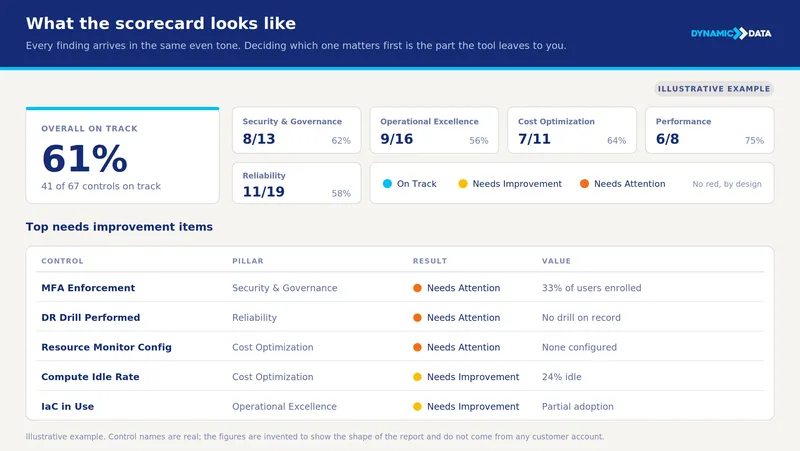
The run is a coffee, not a project. The remediation is not, and that distinction gets lost in every demo. It's the single most useful thing to keep in mind before you show the output to anyone who controls a budget.
The Part That Needs a Human
Read the skill's source and you'll find an instruction set about tone. It forbids red indicators anywhere in the output. It forbids the words "critical", "high-risk", "danger", "failure", "violation", and "urgent" in any user-facing text, asking for "needs attention" or "opportunity for improvement" instead. And it prints a disclaimer stating plainly that the report is not a comprehensive audit.
Those are reasonable choices for a tool that runs against a stranger's account. They also mean every finding arrives looking about as urgent as every other finding. A missing resource monitor and a DR drill nobody has ever run both show up as an orange dot. One is an afternoon of work. The other is the reason a bad Tuesday becomes a bad quarter.
The assessment is very good at telling you what is true about your account. It makes no attempt to tell you which of those truths will hurt you first, because it can't know your business. Somebody has to supply that judgment.
The Questions Each Pillar Puts to Your Account
The scorecard is organized by pillar, so it helps to know what each one is actually asking. You can answer most of these from memory before you run anything, and the ones you can't answer from memory are already telling you something.
Security & Governance. Can you name every principal that can read a given schema right now, including the non-human ones? The pillar holds 13 controls covering network policies, MFA enforcement, SSO, how your service accounts authenticate, SCIM provisioning, Private Link, and object ownership. The newer surface is whether that model reaches agent identity and tool calls. Snowflake's pending acquisition of Natoma, announced in May 2026, is aimed at that extension. A masking policy that stops an analyst but not an agent calling the same view through a tool is a finding, not a design choice.
Operational Excellence. If someone asks what ran last Thursday, against which version of the data and on whose behalf, is that a query or an archaeology project? This one spans 16 controls across governance and FinOps, automation, and observability, including whether infrastructure as code is actually in use, whether CI/CD pipelines exist, and whether alerts are configured. Once agents are running queries on people's behalf, that question gets asked a lot more often, and archaeology stops being an option.
Reliability. What happens when a pipeline produces a wrong answer instead of an error? At 19 controls this is the largest pillar, covering failover groups, cross-region DR, Time Travel retention, backup policies, and release readiness. One of them simply asks whether you have ever performed a DR drill, and if nobody in the room can answer that, the assessment has already earned its afternoon.
Performance. Was your warehouse sizing decided for dashboards or for agents? Eight controls, all automated, looking at queueing, spilling, query timeouts, slow compilation, partition pruning, and the SQL patterns that quietly cost you: exploding joins and redundant aggregates. An agent reasoning through one business question fires dozens of queries in seconds, which is a different concurrency profile from a refresh window.
Cost Optimization. Do your spending limits exist as objects in the account, or as a habit somebody has? You get 11 controls across compute, governance, and storage, including idle compute rate, the statement timeout parameter, credit budgets, resource monitors, and whether spend is attributed by tag. Accenture described a financial services client that found out the hard way, by spinning up agents against Cortex and watching spend climb before anyone set a limit.
Snowflake's product documentation also frames two lenses that cut across all five pillars: AI and data governance, and open interoperability. They don't appear as separate scores in the assessment, but they're a useful way to read the results. The practical test for the first is simple: can you trace a number an agent produced back to the columns it read?
Reading the Output Honestly
The scorecard is a diagnosis, and a diagnosis is only as useful as what you know about its blind spots. Start with the one that costs teams the most time: findings come back unordered. A missing resource monitor and an unmodeled semantic layer arrive with the same severity language even though one is an afternoon and the other is a quarter of somebody's roadmap. Sorting that against what your team can actually absorb is manual work, and it's where most of the value of the exercise ends up living.
The review also can't see what isn't in the account. If your metric definitions live in Looker or Power BI, your agents and your reports are reasoning from different dictionaries. No pillar check will flag it, because there's nothing in Snowflake to check. That gap shows up as a modeling project rather than as a finding.
Data quality has the same shape. It sits underneath every pillar and inside none of them, so a perfectly configured account reading a badly maintained table will hand you a governed, auditable, cost-controlled wrong answer. Accenture put the share of organizations still fighting it at around 80%, which matches what we see.
Then there's shelf life. The scorecard describes your account on the day you ran it, and accounts drift: a grant gets added for a deadline, a warehouse gets resized during an incident and never resized back, someone ships an agent on a Friday afternoon. The pillars you skipped are a blind spot of their own. A Security-only run says nothing about the other four, and it reads a lot like a clean bill of health if you forget that. Running the assessment again in six months and diffing it against this one tells you more than any single run does.
Where to Start
Don't select all five pillars on your first run.
Start with Security & Governance and Performance. Both are fully automated, so you get a real read on 21 controls in one sitting without booking anyone's time. That output alone will tell you whether this exercise is worth escalating.
Do the other three when you can get the right people in a room, because Reliability, Operational Excellence, and Cost Optimization will ask questions that need an owner present. If nobody can say whether a DR drill has ever been run, that's already the finding.
You need ACCOUNTADMIN, or a role that can read SNOWFLAKE.ACCOUNT_USAGE, and at the end you have a clear list of what's true about your account before an agent finds it out for you. What you do with that list is the part that takes a quarter. If you'd rather not read your own scorecard alone, that's the conversation we're happy to have.
Written by Florencia Rottoli
Project Manager