

Snowflake Expedition 2026: What's Ready for Your AI Agents, and What's Still on the Way
We spent Snowflake Expedition 2026 going through 14 sessions, from the keynote to the deep dives on analytics, governance, and data engineering. Almost every one came back to the same idea: AI agents are only as useful as the business context they run on. Snowflake announced a lot to deliver that context, but the pieces arrive at very different stages.
The short version: the foundation is ready. Semantic views, which hold your official metric definitions, are generally available, and so are the controls for what agents can spend and do. The newer layer, the one that helps agents understand what your business terms mean and why numbers move, is still in preview or coming soon. If you lead a data team on Snowflake, that difference decides what you can put in front of the business this year and what you should only pilot.
A quick note on the terms we use throughout: private preview is invite-only, public preview is open for anyone to try but behavior may still change, and generally available means Snowflake supports it for production.
Agents Can Get the Right Data and Still Give the Wrong Answer
Two years ago, the big promise was asking a database a simple question in plain English: how many orders did we get last month? That mostly works now. The questions leaders actually want answered are harder. Why did revenue drop last quarter? An agent can only answer that if it knows your fiscal calendar, which price changes happened, and how customers, contracts, and products relate across sales, finance, and operations.
That knowledge already exists, but it's scattered. It lives in BI models, in transformation code, in wikis and spreadsheets, and in the heads of a few experienced analysts. When each team writes its own definition of "customer" into its own agent, you end up with several versions of the business. The query can be technically correct and the answer still wrong, because the agent counted accounts when finance counts parent companies.
Snowflake's own numbers show how big the gap is. Its data team saw around 25% accuracy on business questions without a context layer (24.1% on the benchmark we cover below). We wrote about this problem after Snowflake Summit in June, in Context is the moat. What changed at Expedition is that Snowflake now has a concrete answer for it, in three layers.
Semantic Views, Cortex Sense, and Business Ontology: Only One Is Ready Today
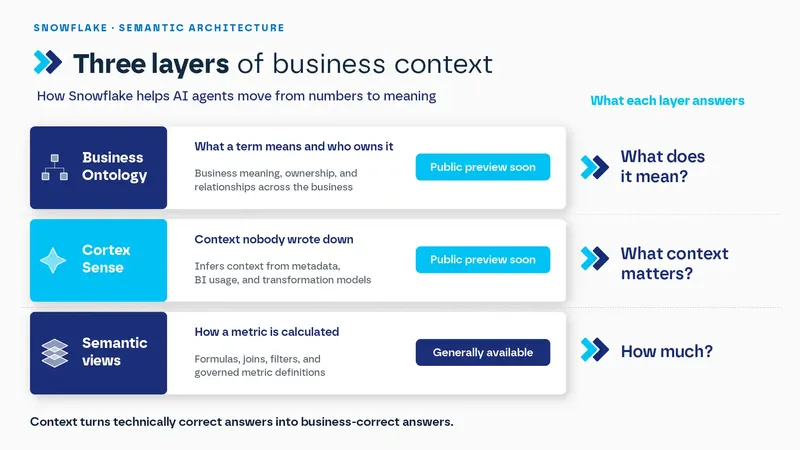
The first layer is the one you can build on now. Snowflake semantic views define how each metric is calculated: the formula for net revenue, the joins, the filters. They let a dashboard and an agent get the same number for the same question. For the revenue question above, this is where "net revenue" gets one formula that finance and the agent both use. Semantic views have been generally available since June 2025, and Snowflake has kept adding to them since. If your metrics aren't in one governed place yet, this is where the work starts. Our post on building semantic models for AI agents goes into how we approach it.
The second layer, Cortex Sense, fills in what nobody has written down. It infers context from the queries your analysts have already run, the models in your transformation tools, and the metrics in your BI, and it reads only metadata and usage patterns, not your data rows. In the revenue example, that's how an agent could pick up your fiscal calendar from the way your analysts already query it. On Snowflake's own benchmark, Cortex Sense improved accuracy from 24.1% to 86.3%. That's a vendor benchmark, not an independent test, but it shows the size of the problem Snowflake is going after. Snowflake had planned a private preview for mid-July, and public preview is announced as coming soon.
The third layer was the headline of the conference. Snowflake Business Ontology records what your business terms officially mean and who approved that meaning, and links each definition to the semantic views that calculate it. Where a semantic view answers "how much," the ontology tells an agent what a term like "net revenue" means, who owns it, and how it relates to the rest of the business. Cortex Sense can draft the first version, but accountable owners decide what becomes official. In our view, that last point matters most for leaders: the definitions your agents use stay owned by people in your business, not by whoever wrote the prompt. Back to the revenue question: the ontology is where it's written down that finance owns "net revenue," so every agent counts it the same way. Business Ontology is announced for public preview soon.
Context tells an agent what your business means. It doesn't tell it what it's allowed to do, or what that will cost.
Cortex AI Gateway and Cost Governance: Controls Before Agents Reach the Business
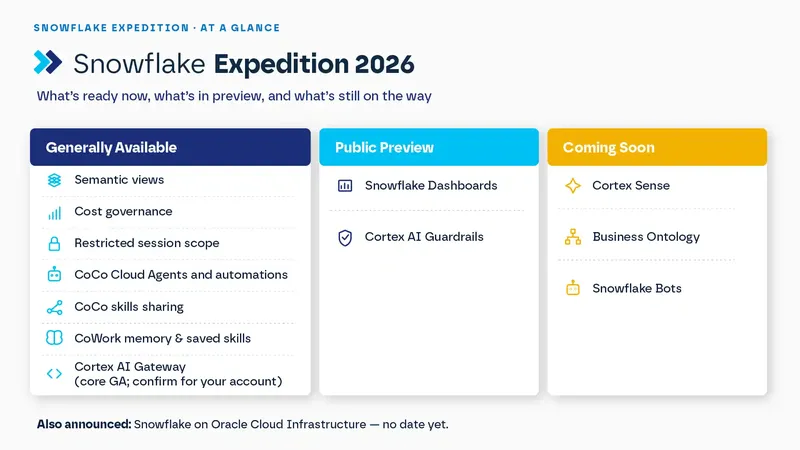
Snowflake announced four tools to answer both questions. Three of them are generally available (one with a caveat we cover below), which makes this the most production-ready part of everything announced at Expedition.
Cortex AI Gateway: one entrance for every agent. Agents rely on AI models to reason and write. The gateway is the single front door through which every agent in your organization reaches those models. Because everything passes through one point, that's where you can see what each request did and what it cost, and where you set limits per user and budgets per team. Snowflake's release notes list its core as generally available, but some of its announcement posts from the same day still call it public preview, so it's worth confirming for your account.
Cost governance: a budget for AI. It shows who is spending what on AI, by team, department, agent, or application. It also lets you cap each user's weekly spend, set budgets across accounts, and get a daily alert when spending jumps unexpectedly. It's generally available. For anyone who has watched a pilot's bill grow faster than its results, this is the one to look at first.
Restricted session scope: limits on what each agent can do. The starting rule is that an agent works with the permissions of the person behind it. Automations (CoCo's scheduled jobs, covered below), for example, run as the user who created them, so the access rules you already enforce apply to the agent too. Restricted session scope goes one step further: it lets an administrator narrow what each agent can do, and it's generally available.
Cortex AI Guardrails: protection against manipulation, still on the way. An agent can be tricked with hidden instructions into doing something it shouldn't, an attack known as prompt injection. Guardrails protect against it, and against similar attacks, across your whole account, for every agent routed through Cortex AI Gateway. They aren't generally available yet: Snowflake lists them as public preview or coming soon, depending on the announcement.
With context and controls in place, the agents themselves come into view.
CoCo and CoWork: Agents for Builders, and for Everyone Else
Snowflake now has two agents, and both are already in wide use: CoCo in more than 9,100 accounts and CoWork in more than 5,800, on average over the last four weeks of the quarter ended July 31, 2026.
CoCo is the coding agent for data teams. At Expedition it gained Cloud Agents, which run CoCo in an isolated, Snowflake-managed environment, and automations that run recurring jobs on a schedule. Both are generally available, with automations in Snowsight and the CLI. Teams can now share skills (reusable versions of one expert's workflow) across the organization, and that's generally available too. In practice, more of the pipeline and modeling work can be done by an agent. The judgment about standards and review stays with your team.
Snowflake CoWork is the agent for everyone else: people who ask questions, request reports, and follow up on numbers. Memory and saved skills in CoWork aregenerally available. The newest additions are at earlier stages. Snowflake Dashboards, which let anyone on the team talk to a dashboard through CoWork, are in public preview. Snowflake Bots, agents that act proactively on a user's behalf, are announced for private preview soon. Snowflake also announced plans to run natively on Oracle Cloud Infrastructure, with no availability date yet, which is worth knowing if your company is built around Oracle.
That's a lot of announcements at different stages. Here's how we're sorting them.
What We'd Do with a Team on Snowflake Today
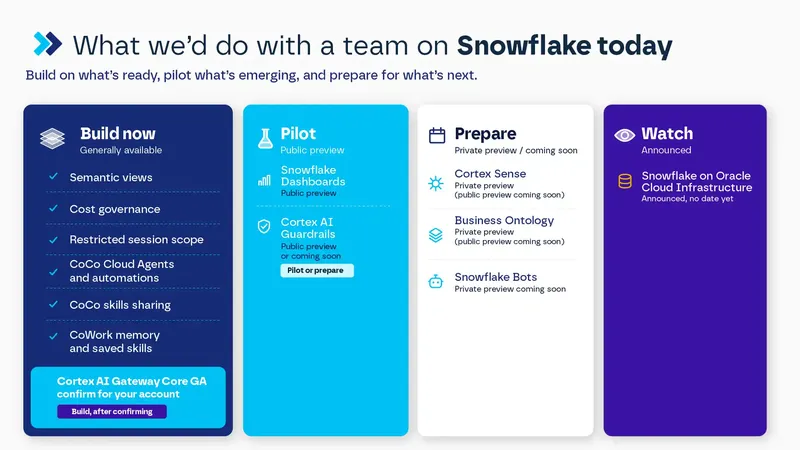
For us, the release stage is the most useful filter for all of this. Build on what's generally available: semantic views, cost governance, restricted session scope, CoCo's cloud agents and automations, and CoWork's memory and saved skills are ready for real work now. Cortex AI Gateway belongs here too, once you've confirmed its status for your account. Pilot the previews, such as Snowflake Dashboards (and Cortex AI Guardrails, if it's in public preview for your account), on low-risk projects where a change in behavior won't hurt anyone. For what isn't in public preview yet (Business Ontology, Cortex Sense, and Bots), prepare instead of waiting. The ontology will be drafted from your semantic views, so every metric you define today is work you won't redo later.
Here's the full list, sorted the same way:
We'd also keep pilots small. Pick one business decision, model the metrics behind it, and measure how often the agent gets it right before you extend it. And because release stages move fast, we check the official release notes before every proposal instead of trusting what we heard on stage.
If you're on Snowflake and want to know where your metrics stand before agents start using them, we're happy to take a look with you. We'll walk through your semantic layer, show you which metrics are ready for agents, and flag the gaps to close first.
Frequently Asked Questions
What did Snowflake announce at Expedition 2026?
The main announcements were Business Ontology and Cortex Sense for business context, Cortex AI Gateway and cost governance for controlling agents, and new features for itsCoCo and CoWork agents, including Snowflake Dashboards and Snowflake Bots.
Is Snowflake Business Ontology available?
Not yet. Snowflake announced it for public preview soon.
What's the difference between semantic views and Business Ontology?
Semantic views define how a metric is calculated. Business Ontology governs what the metric means, who approved it, and links it to the semantic views that calculate it.
Which Expedition 2026 features can teams use in production today?
Among the ones covered here, these are generally available: semantic views, cost governance, and restricted session scope, CoCo Cloud Agents, CoCo automations in Snowsight and the CLI, and skills sharing. Cortex AI Gateway's core is generally available according to the release notes. CoWork memory and saved skills are also generally available. Snowflake Dashboards are in public preview, and Cortex AI Guardrails is listed as public preview or coming soon, depending on the announcement. Business Ontology, Cortex Sense, and Bots aren't in public preview yet.
What is Snowflake Cortex Sense?
Cortex Sense infers business context from the queries your analysts already run, the models in your transformation tools, and the metrics in your BI. It reads only metadata and usage patterns, not your data rows. Public preview is announced as coming soon.
What is Cortex AI Gateway?
It's the single front door through which every agent in your organization reaches AI models. That's where you see what each request did and what it cost, and where you set limits per user and budgets per team. Its core is generally available according to the release notes.
Written by Matías Zanatta
Analytics Engineer