

BI platforms evaluation: Omni
Omni is an innovative business intelligence and embedded analytics platform. The platform was built with the belief that companies shouldn’t have to choose between the speed of ad-hoc data exploration and the accuracy of a data model. Omni excels at enabling team members - technical and not - to collaborate with data.
Our evaluation
Omni stands out by successfully combining the flexibility needed by technical users with accessibility for business users. Its three-layer modeling approach (Schema, Shared, and Workbook) provides a solid foundation for consistent analytics while maintaining the agility needed for exploration. The platform does a wonderful job with its dbt integration, which creates a seamless flow between Omni workbooks and dbt.
One of Omni's greatest strengths is its ability to accommodate different user preferences: you can use Excel-like formulas for complex calculations when selecting and aggregating data, write SQL, or leverage natural language queries. Omni also brings software development lifecycle practices into the DI workflow, with features like a GitHub integration and branching that enable collaborative development and proper quality control, making it particularly suitable for enterprise environments.
Omni also repositioned itself more broadly: it now presents itself directly as "the AI analytics platform," with the message that it turns your data into a source of truth for AI, so anyone can get answers they trust.
Features Overview
Data Connectors
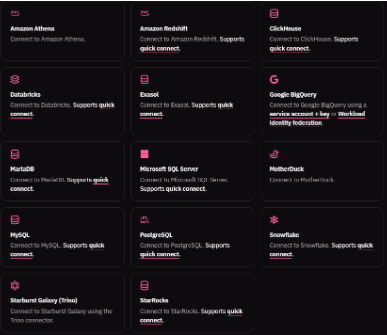
Omni provides robust connectivity to a wide range of modern data warehouses and databases. According to the official database connection page, it currently supports: Amazon Athena, Amazon Redshift, ClickHouse, Databricks, Exasol, Google BigQuery, MariaDB, Microsoft SQL Server, MotherDuck, MySQL, PostgreSQL, Snowflake, Starburst Galaxy (Trino), and StarRocks.
The platform's connection capabilities seem particularly well-suited for organizations with diverse data infrastructure, supporting both traditional databases and modern cloud data warehouses.
Data Modeling Capabilities
Omni implements a sophisticated layered modeling approach that provides more flexibility than other data models, while still ensuring governance. In our opinion, this is where Omni’s core capabilities and personality reside. Here is the deeper and more complex part of the tool, and I would advise people considering it to take the time to understand the wide flexibility it offers..
The architecture consists of three interconnected layers:
- Schema Model: This foundational layer directly mirrors your database structure, providing a reliable base that stays synchronized with your actual data sources. When the schema needs updating, it can be easily refreshed through the UI.
- Shared Model: This serves as a virtualized data layer where global business metrics and definitions are maintained. It acts as the governed, universal data model that all workbooks inherit from, ensuring consistency across the organization.
- Workbook Model: This is where ad-hoc analysis takes place, extending both the schema and shared models. It provides a sandbox environment for developing and testing new metrics and analyses.
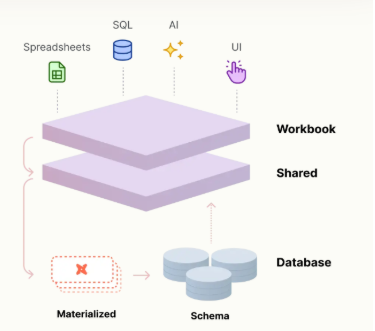
One of Omni's most powerful features is its model promotion workflow: as metrics and analyses prove valuable, they can be promoted from workbook level to the shared model, and eventually into the database schema itself. By enabling just-in-time data modeling, the tool provides a natural progression that supports an iterative development process while maintaining data governance.
Data Modeling Flexibility: Semantic Layer
Omni offers a modern approach to semantic layer implementation that works in harmony with dbt, featuring query-time transformations using smaller units of logic compared to traditional table-level definitions. The platform provides support for reusable snippets of logic that can be combined flexibly, UI-based modeling capabilities while maintaining access to code-level representation, and the ability to define single aggregations, joins, or tables that can be filtered and grouped dynamically. This hybrid approach allows data analysts to contribute to the data model without requiring engineering intervention and supports experimentation and iteration before promoting metrics into shared models, while seamlessly integrating with dbt for cases where advanced transformation is beneficial.
The implementation proves particularly valuable in scenarios where users need interactive exploration with drilling, filtering, and pivoting capabilities, and when teams want to test new metrics or tables alongside existing content. Organizations benefit from reduced dependency on data engineering resources while maintaining governance, as the platform enables easy promotion of changes back to broader shared models. This approach streamlines the workflow between data analysts and engineers, providing a flexible yet controlled environment for data model development and iteration.
We recommend reading Omni's article: The case for a BI semantic layer on top of dbt. There they explain more of their philosophy with clear examples defining cases in which it's better to model in dbt versus Omni.
dbt Integration
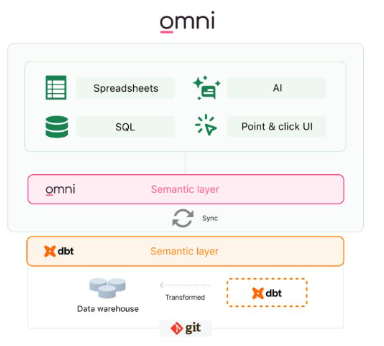
Omni offers a seamless bi-directional integration with dbt (both Core and Cloud versions), making it particularly powerful for organizations that use dbt as part of their data stack. One of its key strengths is working fluidly between the BI layer and dbt models, eliminating the traditional friction between these two environments.
As an analyst, you can pull in valuable context directly from your dbt environment into Omni, including model descriptions, field descriptions, and even SQL code for tracing logic. This means you don't have to constantly switch between tools to understand your data's lineage or meaning. Furthermore, Omni automatically syncs any changes made in dbt through its schema refresh feature, ensuring your BI layer stays up-to-date with your data models.
What's particularly interesting is Omni's dynamic schema switching capability. This allows you to easily toggle between development and production environments while working on analyses. For instance, you can validate how changes to your dbt models might impact dashboards before safely pushing them to production, all within the same tool. Additionally, if you develop a metric or new model in Omni that you think would be valuable to solidify in dbt, you can push it directly to dbt with a simple click, creating a new pull request in your dbt repository.
Omni has integration with dbt's semantic layer (dbt Semantic Layer / MetricFlow), reading metadata directly from your dbt semantic layer project and mapping dimensions, entities, measures, and metrics into your Omni model, without needing to recreate them. There are some behavioral differences worth knowing about: it currently doesn't support cumulative or conversion metrics, nor dbt's "time spine" concept (Omni addresses this by letting you fill in dates for analysis over time windows). We did not, however, find evidence of a specific integration with Cube.
Workbooks
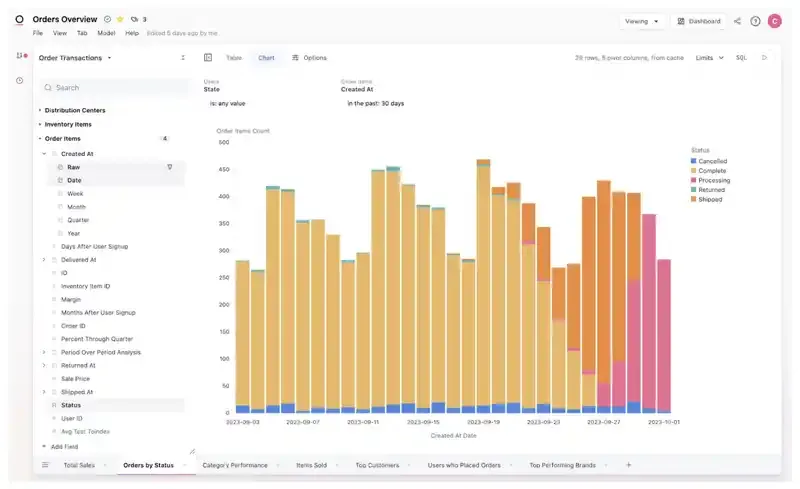
Omni workbooks let you query modeled and raw database data through multiple tabs, using either a point-and-click UI, pivot-table interface or SQL. The URL updates with each action for easy navigation and sharing, with each tab's state encoded separately.
Workbooks have version history that you can check and restore, similar to several Google products including Looker Studio.
You can share Workbooks with team members, giving them either view-only access to provide feedback, or full editing permissions to allow them to collaborate with you. You can also transfer complete ownership to another member of your organization if needed.
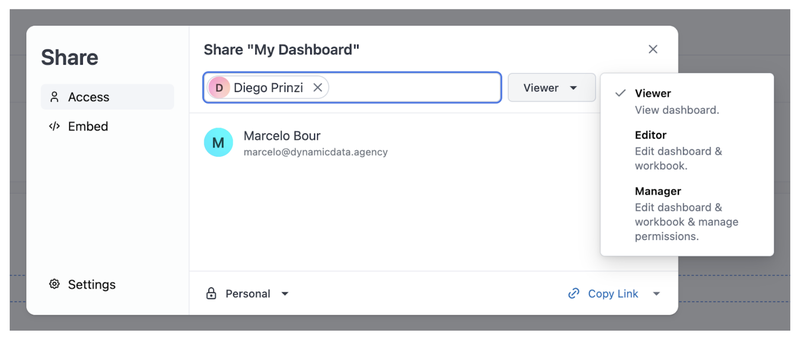
The tool does not seem to be designed or suited for two people editing the same dashboard simultaneously. In our case, we encountered some error messages and substantial delays in updates.
Artificial Intelligence
Omni has built AI into the whole platform: it's not an isolated feature, but is available at several touchpoints:
- Chat: a natural-language interface that keeps context from question to question.
- Dashboard: lets you synthesize insights across several charts and dig in further, just by asking.
- Workbook: you can build queries with a prompt, and switch into point-and-click, SQL, or spreadsheet formulas at any point.
- MCP Server: a Model Context Protocol server that lets you use Omni's querying capabilities from your team's chatbots and other external AI tools.
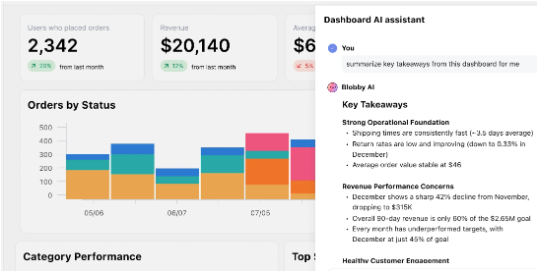
All of this AI runs on top of Omni's semantic layer: the shared model that defines metrics, dimensions, relationships, and business logic in one place. According to the official documentation, Omni uses Claude models hosted on AWS Bedrock for most tasks, and OpenAI models only for advanced AI visualizations, Omni doesn't have its own model.
You can directly ask things like "What were the 3 products with the highest gross profit during last quarter?" It can also be used to generate complex calculated fields, like extracting parts of a string or creating arithmetic operations, and to help you write Excel-like formulas when you don't remember the syntax or need a more complex one.
On top of that, Omni added a whole set of tools under the concept of context modeling, meant to help AI reason better about your data:
- Modeling Agent: ask it in natural language to create views, define joins, or optimize Topics for AI, and it returns YAML ready for you to review and commit.
- Topics: curated, structured datasets that tell AI agents which tables to join and how to model a question, designed so non-technical users can explore data without writing SQL.
- AI Hub: a dashboard for observing how AI is performing, fixing what needs fixing, and validating that it's working well.
- Agent Skills: lets you package a set of instructions into a button anyone on the team can click; when triggered, the AI follows those instructions.
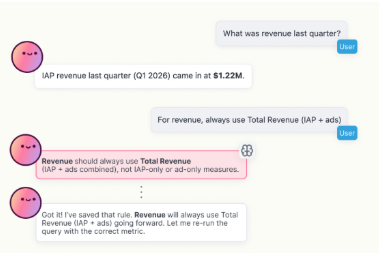
Beyond the MCP Server, in March 2026 Omni launched a native Claude Desktop connector: it connects in two clicks from the Claude Marketplace, and any question you ask Claude about your data stays anchored to the business context and security rules of Omni's semantic layer, instead of being a free-form answer from the model. Along with the connector, Omni open-sourced a library of Claude Skills — folders of reusable instructions for specific tasks, such as exploring the data model, creating views and metrics in YAML, managing permissions and schedules, or embedding dashboards. The same connector logic also exists for ChatGPT, launched a couple of weeks later.

Available Visualizations
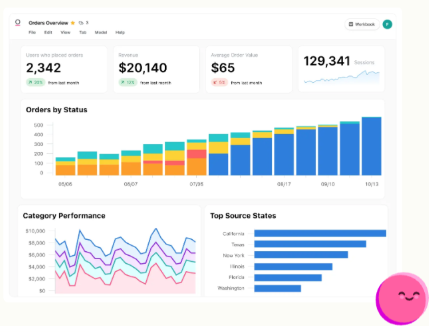
Omni provides a comprehensive suite of visualization options that covers all conventional chart types while adding some particularly useful specialized visualizations. The platform includes:
- Standard charts (bar, line, pie, scatter plots).
- KPI cards - A specialized visualization type that effectively displays single values and their variations.
- Geographic visualizations - Both point-based and region-based maps.
- Advanced analytics - Including box plots for statistical analysis and many other options, including Sankey and Waterfall charts that are enabled through the integration of Vega-Lite. See more examples here.
- Markdown visualizations.
- Tables and pivot tables.
The visualization creation process is intuitive and user-friendly. The platform offers extensive customization options for all basic elements including colors, positions, legends, and sorting orders. This flexibility allows users to fine-tune their visualizations to match specific reporting requirements.
Omni's dashboard editor was completely redesigned: it now works with a system of containers of two types — Grid, for free-form positioning, and Stack, for arranging items in rows or columns with controlled spacing — which can be nested inside one another to build more structured layouts than a flat grid.. The platform maintains a tab-based organization system for visualizations, making it easier to reference and modify specific charts when working collaboratively. Users can seamlessly switch between dashboard view and individual chart editing.
Filters and Parameters
Omni offers a robust and flexible filtering system with two main filter types: advanced filters supporting multiple selections (set as default) and single select filters for exclusive choices.
At the dashboard level, the platform provides an intuitive interface with easy filter addition, the ability to set default filter values, selective filter application to specific tiles, and faceted filtering where filters automatically update based on other filter selections, such as cities updating when a state is selected.
The system includes advanced capabilities that enhance its functionality, including field mapping that allows one filter to update different fields across visualizations, user attribute filtering for dynamic, role-based views, hidden filters for background filtering, and URL parameter support for filter manipulation. A "Collapsible filters" dashboard-level setting was also added, controlling how filters collapse in the view.
Mobile-Responsive Dashboard Layout
Omni automatically adapts dashboard layouts for mobile devices, but this is controlled with much more precision today: each container (Grid or Stack) has its own "On mobile" setting, with five possible options:
- Auto: uses Omni's automatic mobile layout (default option).
- Stack vertically: forces items to stack vertically, even if they're naturally in a row.
- Wrap items: keeps items in a row, but lets them wrap to multiple lines.
- Keep layout: preserves the desktop layout exactly as designed, with no automatic adjustments.
- Hide: hides the container entirely on mobile devices.
There's also a mobile preview mode to test how this configuration looks on smaller screens before sharing the dashboard.
Exporting Data
Exporting data is easy. The results of a query or tab within a workbook can be downloaded as CSV, Excel (XLSX), or JSON, with the option to import up to 1 million rows in XLSX format. Separately, a chart or an entire dashboard can also be downloaded as a PDF or PNG; in fact, support has been added for choosing page size and orientation in PDF downloads and scheduled deliveries. For automated workflows, there is also a download API that initiates the process asynchronously, for both an entire dashboard and an individual tile.
Monitor and Audit Tool Usage
Omni provides comprehensive audit logging capabilities to track user activity and system performance. The platform maintains detailed activity records, structured as JSON payloads, which today can be sent to Amazon S3, Google Cloud Storage, or Azure Blob Storage for storage and analysis.
Key event tracking features include:
- Document access (workbook and dashboard loads).
- Query execution monitoring.
- Dashboard download tracking.
- User management events (such as new invites).
This feature requires initial setup through Omni support.
Scheduled Reports & Alerts
Omni offers two primary automation methods for content delivery: Schedules for regular, frequency-based delivery, and Alerts for condition-based delivery, both also supported in embedded instances if you're using Omni to power customer-facing dashboards in your product. The platform provides multiple delivery destinations, including email support for both Omni users and external stakeholders with customizable sender options, SFTP delivery to existing servers, and Slack integration for individual users and channels.
Omni lets you customize data deliveries through webhooks. While the platform offers basic customization options for standard methods — such as configuring email senders or Slack message formats — webhooks enable more sophisticated workflows. For example, using automation tools like Zapier, you can intercept Omni's webhooks to automate additional tasks.
Exporting to Google Sheets is a native delivery destination within Omni's own scheduler, with write modes to overwrite the sheet, create a new sheet for each delivery, or append rows at the end.
Embedding Features
Omni provides two distinct embedding approaches to accommodate different use cases. The internal embedding approach supports seamless integration within your organization's existing tools and platforms, including wikis, Salesforce, Notion, and other iframe-compatible systems. This solution ensures secure access through authentication-based controls, automatically prompting users to log in through the iframe if they haven't already authenticated, while maintaining a smooth experience within your internal systems.
The external embedding approach is specifically designed to deliver data to users outside your organization through other applications, like your customer-facing product. With robust row-level permissions, you can precisely control what data each user can access based on their specific context. Although pricing information is not available for the tool, this is a feature that has separate commercial tiers.
User Management & Security
Omni provides enterprise-grade security features with flexible authentication and user management capabilities:
License Types & Roles:
The licensing structure today has three tiers: Viewer (view-only access to dashboards built on Topics), Standard (can create, edit, and view workbooks and dashboards, and query Topics from the UI or with AI; the "Standard Querier" level can also use SQL), and Administrator/Developer (can also modify shared model files and, in its Connection Admin variant, connection settings). A user's license type is calculated based on their highest connection role across all connections, and whether they're an organization administrator.
There's granular permission management at both the individual and group levels.
Authentication & Integration:
The platform offers comprehensive authentication through SAML 2.0 integration with major providers (Okta, Microsoft Active Directory, and Google Workspace), along with SCIM protocol support and customizable SSO capabilities.
User Attributes System:
Six default system attributes including:
- Administrator status
- User email
- Embed entity
- User groups
- User ID
- Username
Custom attribute creation capability with:
- Multiple data type support (String, Number)
- Multi-value options
- Default value settings
- Description fields
Access Control:
- Row-level security through access filters
- Topic and field-level permissions via access grants
- Custom field visibility based on user attributes
- Group-based access management
- Attribute-based data filtering for embedded content
Other Integrations & API
Omni provides comprehensive integration capabilities through:
Development Integration:
- Git support (GitHub, GitLab, Azure DevOps) with branch-based workflows and version control.
- Development workflow features including branch mode, automated schema refreshes, and metadata sync.
Core APIs:
- REST APIs for document management and user lifecycle (SCIM 2.0).
- Secure token-based authentication with rate limiting.
Pricing
Pricing information is not publicly available. The platform offers a free trial option through their website by submitting professional contact information.
Performance Considerations
During the testing period, we noticed occasional loading delays in certain sections of the tool. In some instances, we had to refresh the browser to ensure proper functionality. While these occurrences were infrequent, they are worth mentioning as part of the overall user experience.
Updates
The development team maintains an active update schedule, with weekly releases that include bug fixes, performance improvements, and new features. In fact, Omni's own weekly demo calendar is still published and active in 2026, covering AI, dashboards, modeling, and platform updates.
Final Thoughts
In its first layer, Omni is a smooth, easy, and intuitive tool, but its true potential unfolds in deeper layers, where it reveals itself as a broad toolset that can enable organizations to connect and facilitate interaction between different roles and tasks in the data field.
Its most powerful features will require commitment, but they'll pay off for the effort invested. Even so, it's a tool that offers great versatility in how it can be used: profiles more accustomed to working with code and version control will feel comfortable with its development features, while someone accustomed only to working with spreadsheets will also find a familiar starting point to connect with the tool.
This represents a meaningful approach to democratizing information, avoiding compromise relationships between usability and power, and improving the paradigm of how information flows between different layers and roles.
Frequently Asked Questions
Does Omni integrate with dbt's semantic layer? Yes. Omni reads metadata directly from the dbt Semantic Layer / MetricFlow project and maps dimensions, entities, measures, and metrics into its own model, without needing to recreate them. There are some specific limitations, like the lack of support for cumulative or conversion metrics.
What AI models does Omni use? According to its own documentation, Omni uses Claude models hosted on AWS Bedrock for most tasks, and OpenAI models only for advanced AI visualizations. Omni doesn't have its own model.
Can you use Claude or ChatGPT directly with Omni's data? Yes. Omni has a native connector for Claude Desktop (two clicks from the Claude Marketplace) and an MCP Server that exposes its querying capabilities to other AI tools, always respecting the semantic layer and security rules defined in Omni. An equivalent integration exists for ChatGPT.
How many databases can Omni connect to? Fourteen natively: Amazon Athena, Amazon Redshift, ClickHouse, Databricks, Exasol, Google BigQuery, MariaDB, Microsoft SQL Server, MotherDuck, MySQL, PostgreSQL, Snowflake, Starburst Galaxy (Trino), and StarRocks.
Contact us if you want to see Omni in action!
Marcelo Bour, Dynamic Data.